A mortgage affordability calculator template Template is best understood as a structured worksheet that turns income, existing debts, available cash, mortgage assumptions, and housing costs into a reasoned estimate of a manageable home price. Its purpose is not simply to produce the largest possible loan number. A useful template helps a buyer understand which financial constraint is limiting the result and whether the proposed payment still fits the household budget after ordinary living costs are considered.
That distinction matters because borrowing capacity and affordability are not the same thing. The Consumer Financial Protection Bureau advises buyers to focus on a mortgage that fits their broader financial priorities rather than relying only on the amount a lender might be willing to provide. A lender’s assessment may not capture every savings goal, household expense, or future change in circumstances. A well-designed worksheet therefore works as a planning model, not as a promise of loan approval.
The most useful versions make their assumptions visible. They show the relationship between gross income, monthly debt obligations, the proposed down payment, interest rate, loan term, property taxes, insurance, mortgage insurance where relevant, and other recurring housing costs. That transparency makes a spreadsheet especially valuable because a buyer can change one assumption at a time and see how the affordability result moves.
What a mortgage affordability calculator template should actually measure
A strong worksheet begins with the monthly amount that a household can reasonably devote to housing. That figure should not be confused with the maximum payment that a lender’s ratio might permit. The worksheet should give the user a place to enter gross income and recurring debt payments, then separately account for property-related costs that may sit outside principal and interest.
The core calculation usually moves through several stages. First, income establishes a gross monthly resource base. Existing debt payments reduce the amount of that income available for a new mortgage. A housing ratio or total debt-to-income ratio can then provide a planning ceiling. The proposed property taxes, insurance, association dues, and mortgage insurance can reduce the amount left for principal and interest.
The next stage converts an affordable principal-and-interest payment into a loan amount using the interest rate and term. The down payment then connects the loan amount to a potential purchase price. This backward approach is more useful for affordability planning than simply entering a preferred home price and calculating the resulting payment because it reveals the financial ceiling first.
For example, suppose a hypothetical household has gross monthly income of 8,000 in its chosen currency and 600 of existing monthly debt. If the household selects a planning debt ratio of 36%, the total debt ceiling would be 2,880 per month. Subtracting the existing 600 leaves 2,280 for the proposed housing debt under that particular assumption. This is an illustrative calculation, not a lender requirement.
The worksheet should then distinguish between the full housing cost and the principal-and-interest component. If estimated taxes, insurance, mortgage insurance, and association fees total 480 per month, only 1,800 remains for principal and interest in the example. That 1,800 can then be converted into an estimated loan amount using the selected rate and term.
This structure prevents a common error: treating the principal-and-interest payment as if it were the entire cost of owning the property. The CFPB specifically notes that expenses such as property taxes, homeowners insurance, and private mortgage insurance can form part of the monthly housing payment. A practical calculator should therefore make those items visible rather than burying them inside a single number.
Essential input fields for the worksheet
The first input group should capture income. A simple version can use annual gross household income, while a more detailed model can separate primary income, secondary income, recurring investment income, and other income that a lender is likely to recognize. Separating the sources is useful because some income streams may not be treated identically during formal underwriting.
The second input group should capture existing obligations. Common examples include car payments, student loans, credit-card minimums, personal loans, child-support obligations, and payments on other properties. The goal is not to record every household purchase, but to identify recurring obligations that materially affect the amount available for housing.
The third group covers cash available for the purchase. This can include the intended down payment and, in a more complete worksheet, a separate reserve for closing costs and post-purchase liquidity. Keeping these amounts separate matters because using every available dollar for the down payment can leave too little cash for transaction costs, moving, repairs, or an emergency reserve.

Loan assumptions form another essential block. The worksheet should identify the proposed interest rate, repayment term, payment frequency where relevant, and whether the rate is fixed or subject to change. These variables have a direct effect on the payment supported by a given loan amount.
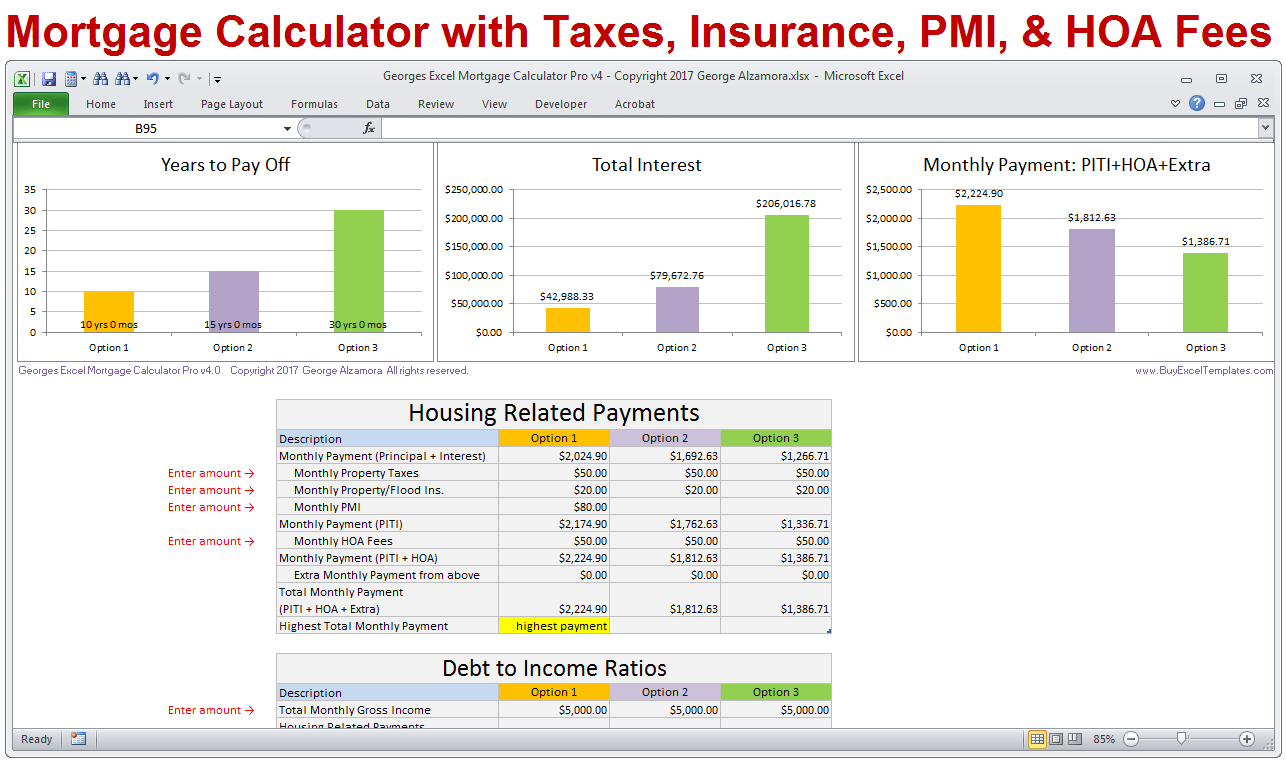
A mortgage affordability model should also identify the property-cost assumptions. Depending on the market, these can include annual property tax, homeowners insurance, mortgage insurance, association fees, and other recurring charges. The labels should be explicit so that users do not accidentally enter an annual amount into a monthly field.
Finally, the output area should show more than one number. At minimum, it should show an estimated affordable home price, loan amount, down payment, principal-and-interest payment, and total estimated housing payment. A useful design also identifies the ratio or cash constraint that is currently limiting the result.

Debt-to-income ratios and why they matter
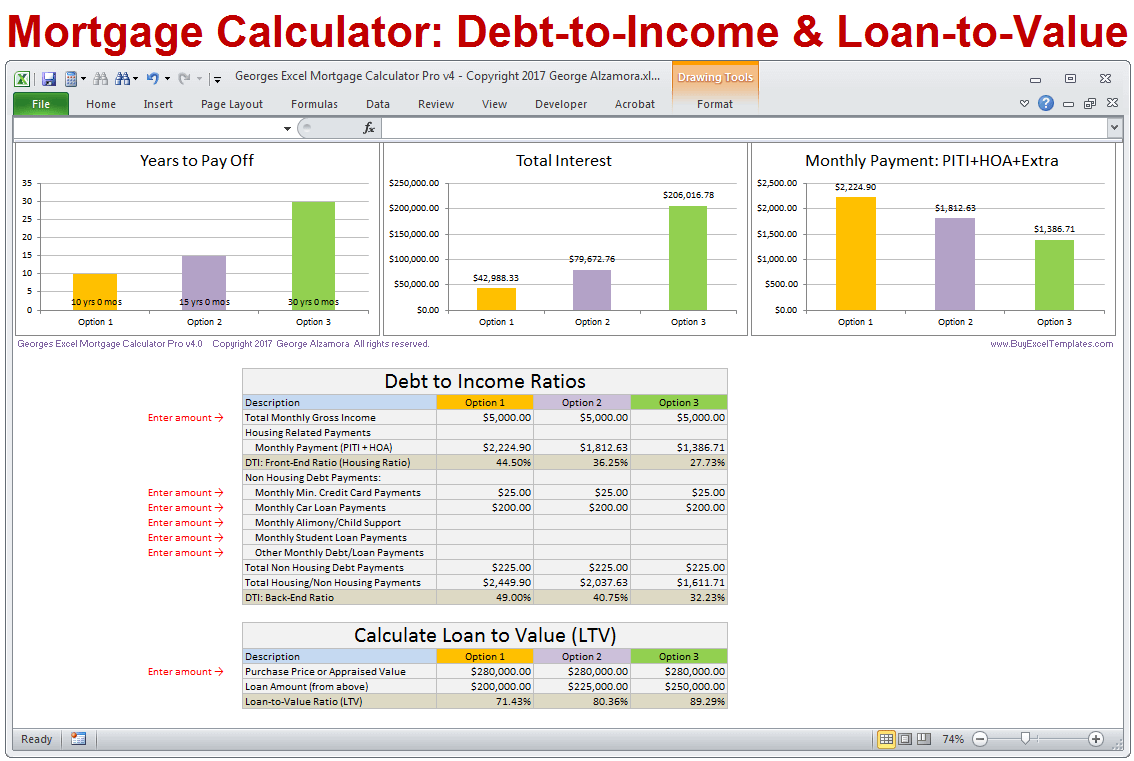
Debt-to-income ratio, commonly abbreviated as DTI, compares recurring debt obligations with gross income. It is one of the most important concepts to include in an affordability worksheet because existing obligations can materially reduce the amount of income available for a new mortgage.
A front-end housing ratio focuses on housing expenses, while a back-end ratio includes housing expenses plus other recurring debt. Different lenders and loan programs use different criteria, so a template should treat ratio assumptions as adjustable inputs rather than universal rules. Freddie Mac, for example, describes housing-expense and total-debt ratios as important measures lenders may use when assessing affordability.
A good worksheet can calculate both ratios side by side. This makes it easier to identify whether the household is constrained by housing cost alone or by total debt. If the back-end ratio is the binding constraint, paying down an existing monthly obligation may improve affordability more than increasing the down payment by the same cash amount.
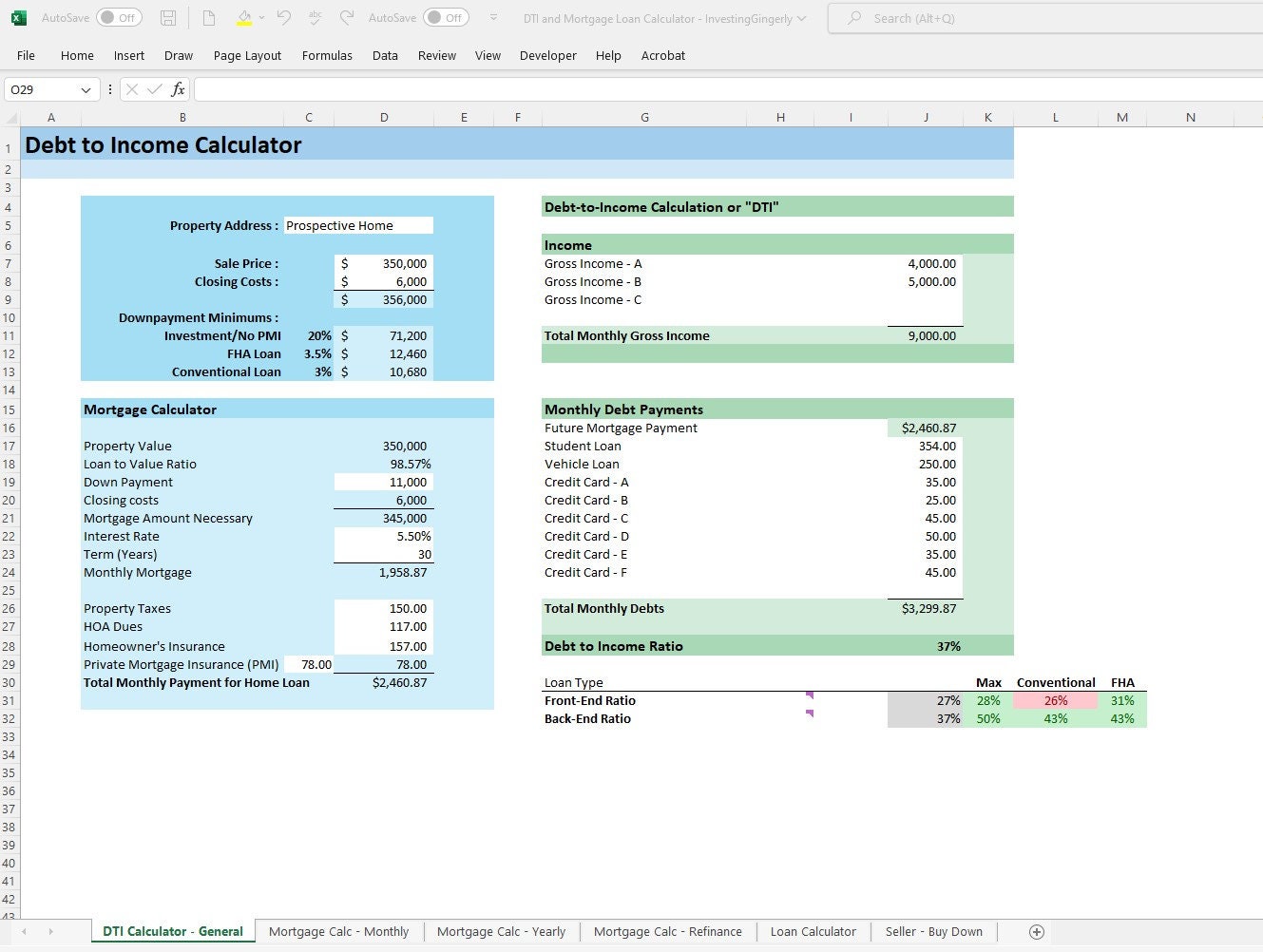
For a hypothetical example, consider gross monthly income of 9,000 and existing monthly debts of 1,200. A 36% total-debt planning limit produces a total debt ceiling of 3,240. That leaves 2,040 for housing-related debt under the selected assumption. If another housing ratio permits only 1,900, the lower amount becomes the more restrictive result.
This “lower of the limits” approach is important because affordability is often governed by the tightest constraint. A worksheet that simply adds several maximums together can produce an unrealistic result. Instead, each constraint should be calculated independently, with the final result based on the most restrictive relevant assumption.
Ratios should also be interpreted carefully. A ratio does not know whether a household has unusually high childcare costs, irregular income, expensive transportation, or a major savings objective. That is why a personal budget check should sit beside the lender-style calculation rather than being replaced by it.

Down payment, loan-to-value, and cash reserves
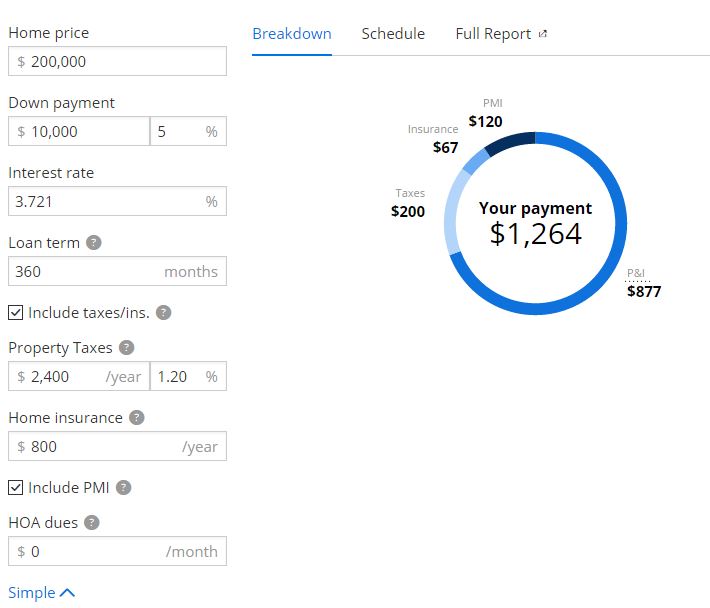
The down payment affects affordability in more than one way. A larger down payment reduces the loan balance required for a given purchase price, which can reduce principal and interest. Depending on the loan structure, a larger down payment may also reduce or eliminate mortgage insurance. The exact treatment varies by market and loan type.
Loan-to-value, or LTV, is the relationship between the mortgage amount and the property’s relevant value. A worksheet should calculate this percentage automatically because it gives users another way to understand the financing structure. A purchase with a low LTV may require less borrowing, while a high LTV can increase financing costs or introduce additional requirements depending on the loan program.
Cash reserves deserve their own field. The amount left after the down payment and transaction costs can be more important to a household’s resilience than pushing the purchase price to the maximum theoretical level. A useful worksheet therefore allows a buyer to test a purchase price while preserving a chosen cash reserve.
Interest rate and loan-term sensitivity
Interest rate sensitivity is one of the most useful features to add to a mortgage affordability calculator. A buyer should not rely on a single rate assumption when a purchase decision may occur weeks or months later. Testing several rates can show whether the proposed price remains manageable when borrowing costs change.
Loan term matters as well. A longer repayment period generally lowers the scheduled payment for a given balance but can increase total interest over the life of the loan. A shorter term can produce a higher required payment while reducing the time over which interest accumulates. The worksheet should make both payment and total interest visible.
Scenario comparison is more useful than a single calculation. A buyer might compare a lower purchase price at a higher rate, a higher purchase price at a lower rate, and a middle scenario. The purpose is not to predict rates but to understand the sensitivity of the household budget to assumptions that are outside the buyer’s control.
A simple sensitivity panel can include three interest-rate cases and three purchase-price cases. Each case can return the monthly principal-and-interest payment, estimated total housing cost, debt ratio, loan amount, and cash required. This creates a compact decision framework without requiring a complex financial model.
The important principle is that the rate should be treated as an assumption, not as a guaranteed future offer. MoneyHelper in the UK similarly describes affordability calculators as rough estimates because lenders use their own criteria and may request additional information before making a lending decision.
Australian buyers should also recognize the same modeling principle. Moneysmart describes mortgage calculators as models rather than predictions and notes that results are estimates that do not guarantee eligibility. Its guidance also encourages users to consider how changes in interest rates affect repayments.

How to structure the spreadsheet or document
The best structure is usually divided into inputs, calculations, outputs, and notes. Inputs should be visually distinct from formulas so that users know which cells they are expected to change. Calculated fields should remain protected or clearly labeled, and assumptions should be documented beside the relevant value.
For people searching specifically for a mortgage affordability calculator template template word, a document-oriented version can work as a planning form. It should contain labeled fields for income, debts, cash, rate, term, housing costs, and the resulting affordability estimate. The document format is useful when a buyer wants a worksheet that can be reviewed alongside other home-buying records.
For people searching for a mortgage affordability calculator template template pdf, the most useful design is a fixed-form layout that preserves field labels and calculation instructions. A static document can be valuable for review or printing, but formulas cannot be expected to recalculate unless the document is paired with suitable calculation functionality.
A printable layout should keep the most important inputs on the first page. The output should not be separated from the assumptions that produced it. A reviewer should be able to see the income, debts, rate, term, down payment, and housing costs without navigating through unrelated sections.
For readers searching for a mortgage affordability calculator template template printable, a one- or two-page worksheet can be especially effective. The first page can contain inputs and the affordability calculation, while the second page can provide scenario comparisons, notes, and a checklist of figures to verify before relying on the result.
A Word-oriented version can also be useful for advisers who need a narrative explanation beside the numbers. A search for mortgage affordability calculator template template doc generally indicates a desire for an editable document format rather than a complex workbook. The key is to keep the calculations transparent and avoid presenting a document as an official lender form unless it genuinely is one.
UK and Australian considerations
A mortgage affordability calculator should be adapted to the market in which it is used. A generic worksheet can demonstrate the logic, but local taxes, insurance structures, lender criteria, loan terminology, and repayment practices can differ. A country label should therefore be treated as a signal to review assumptions, not as proof that a worksheet contains current local lending rules.
For someone searching for a mortgage affordability calculator template template uk, the worksheet should use familiar UK terminology and allow income and expenditure to be assessed in a way that reflects local lending practices. MoneyHelper notes that lenders consider income, outgoings, employment circumstances, and other evidence when deciding how much a borrower may be able to obtain.
For a mortgage affordability calculator template template australia, the worksheet should likewise be localized rather than simply replacing the currency symbol. Moneysmart notes that mortgage calculations are estimates, that lender eligibility is separate from calculator results, and that rate changes can materially affect repayment costs.
Understanding amortization inside an affordability model
Affordability and amortization are related but different calculations. Affordability asks how much payment the household can reasonably support. Amortization determines how a particular loan balance is repaid over time. The two need to connect correctly if the worksheet is going to convert an affordable payment into a loan amount.
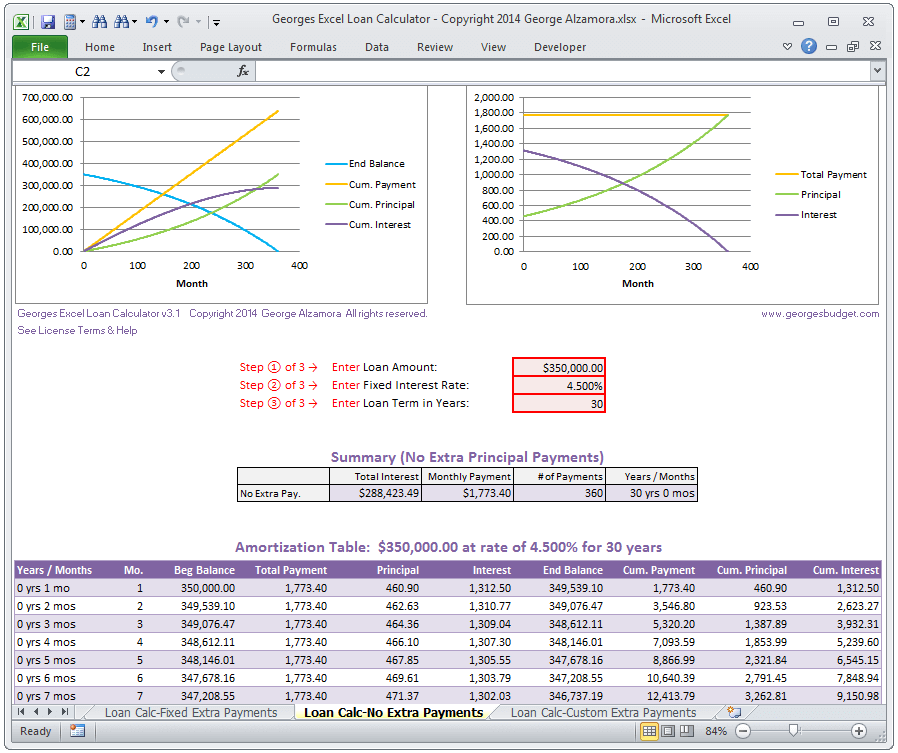
For a standard fixed-rate repayment loan, the periodic payment depends on the principal, periodic interest rate, and number of payments. A spreadsheet can use a built-in financial function or an explicit formula. The important point is that the rate used in the calculation must match the payment frequency and the term assumptions.
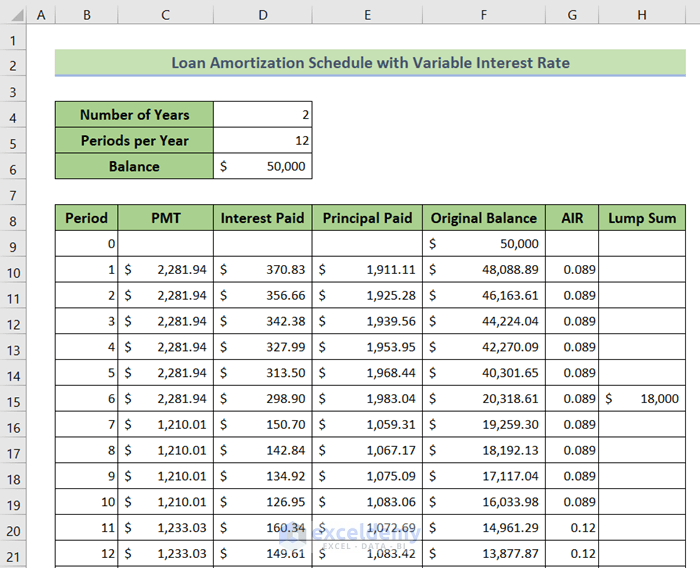
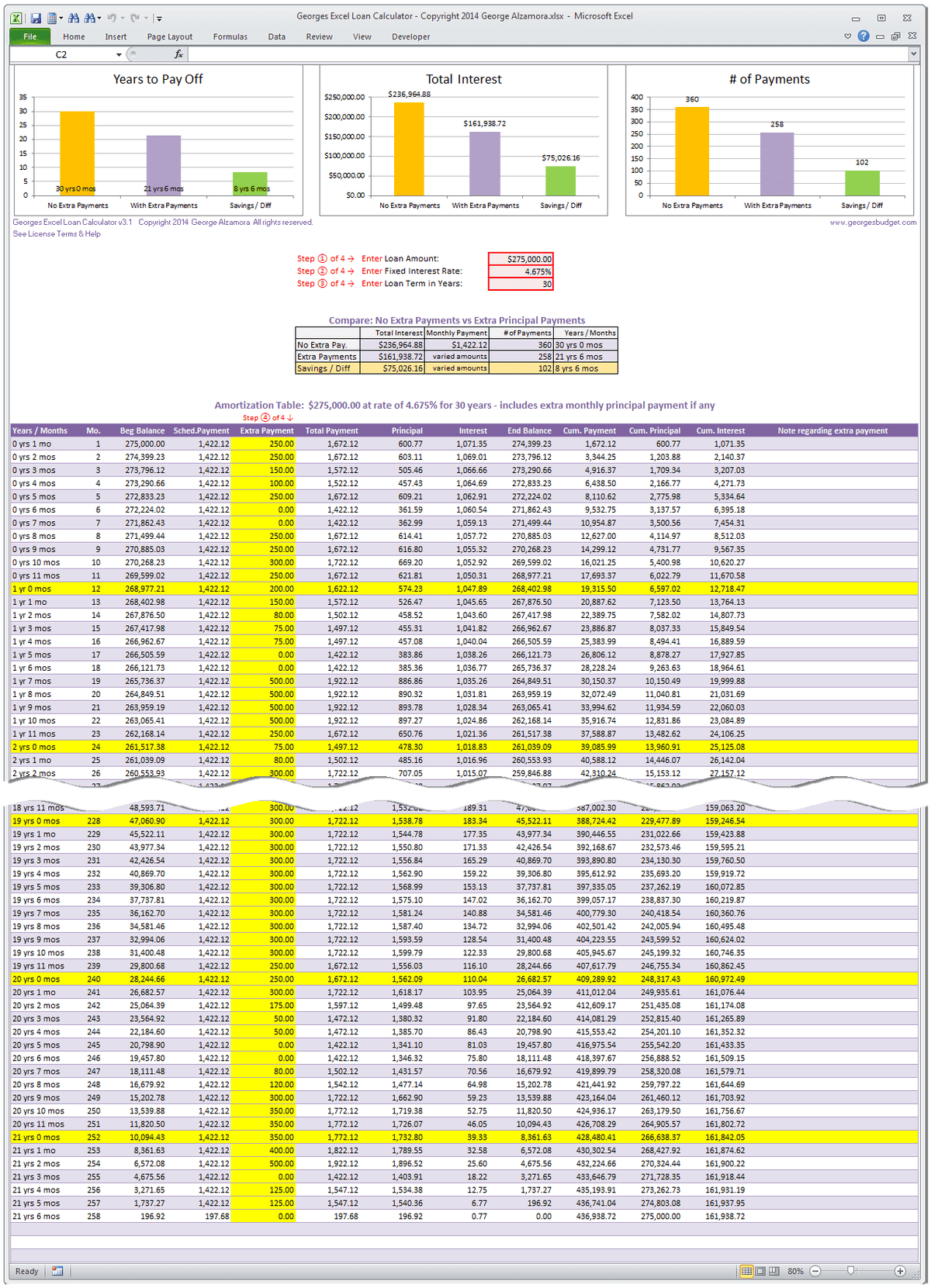
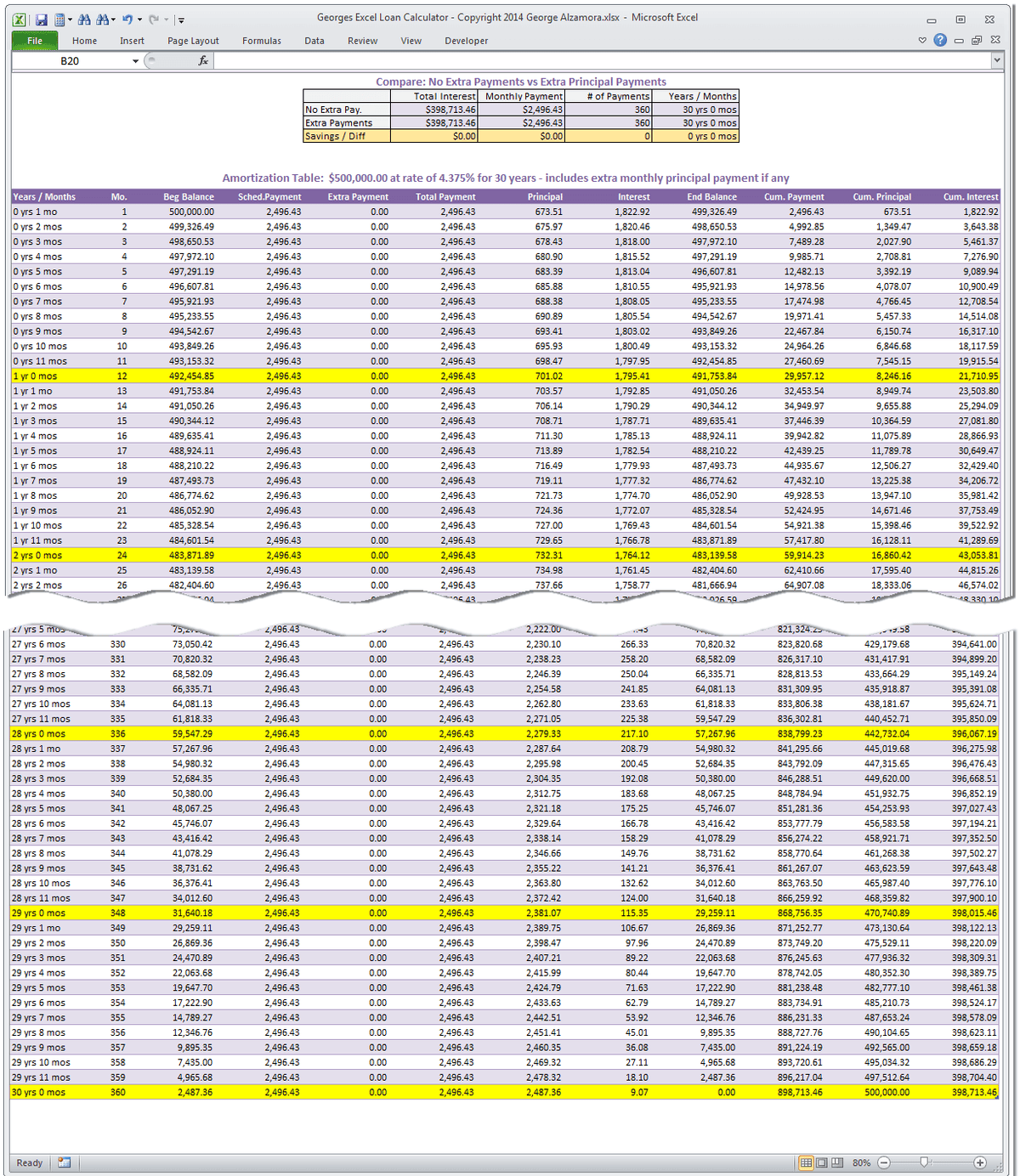
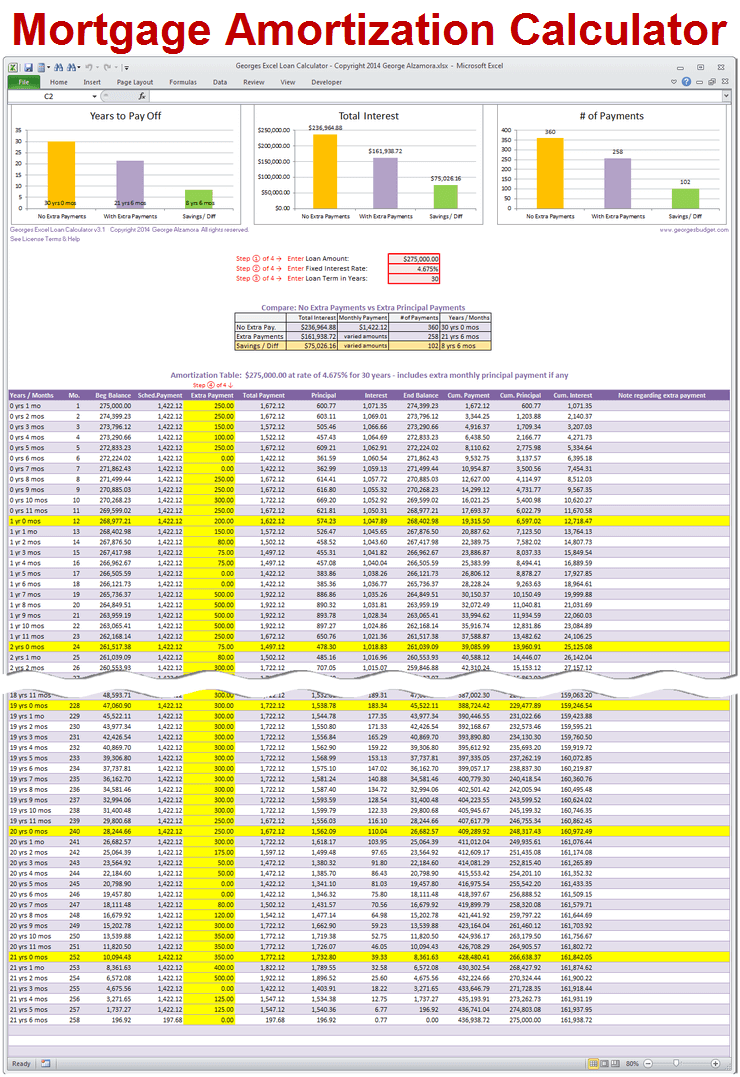
An amortization schedule can then show how each payment is divided between interest and principal. Early payments on a typical fully amortizing loan contain a larger interest component, while the principal component generally becomes larger as the balance declines. This information is valuable when comparing loan terms or considering additional principal payments.
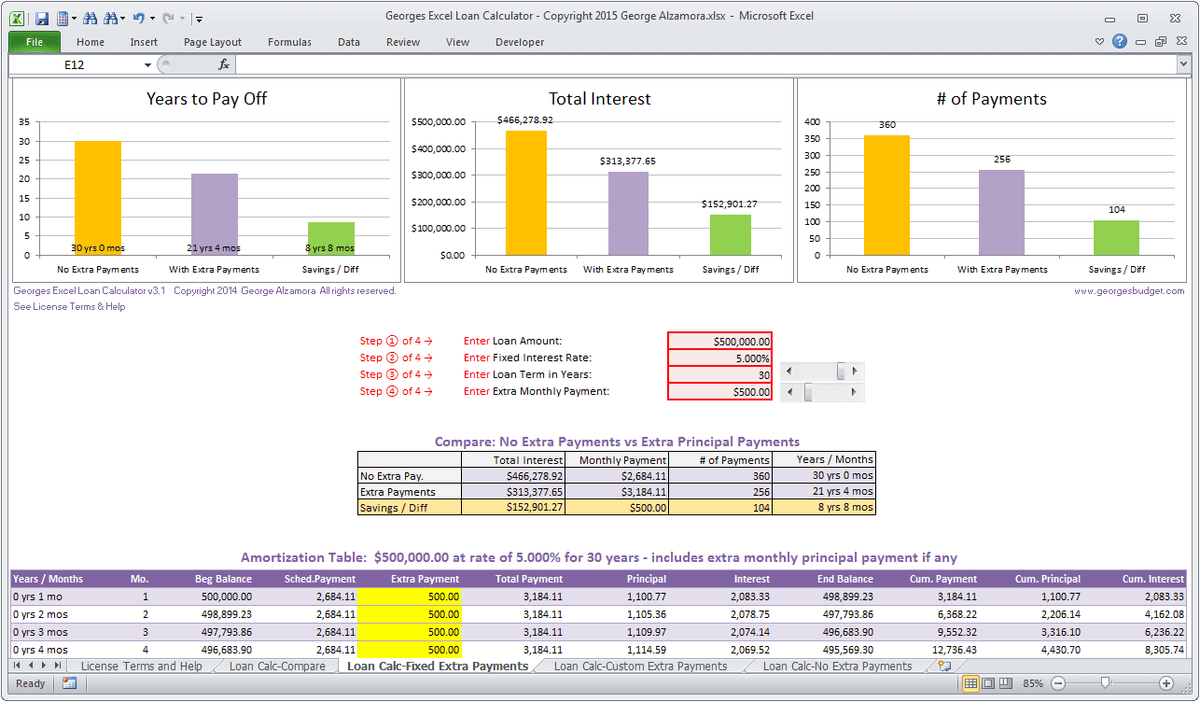
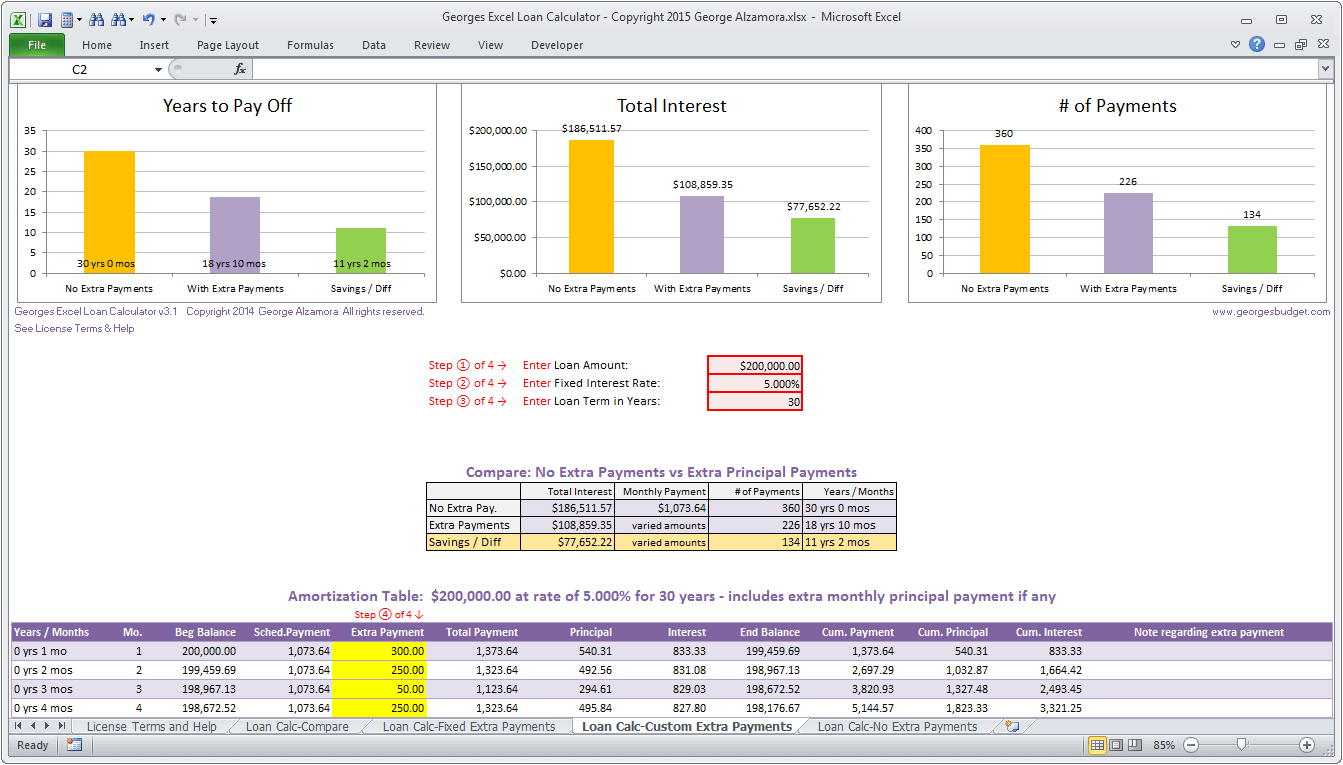
One practical use is to test whether a lower purchase price with a standard payment provides more flexibility than a higher purchase price paired with optional additional payments. Optional payments should not be treated as guaranteed affordability because household circumstances can change. The required payment is the more important number for the initial affordability decision.
A second use is to compare terms. If a hypothetical 30-year loan produces a manageable payment while a 20-year loan creates excessive monthly pressure, the worksheet makes that trade-off visible. It can also show the difference in total interest without suggesting that one term is automatically best for every household.
The worksheet should avoid false precision. Displaying a result such as 327,481.37 does not mean the household’s true sustainable price is accurate to the nearest cent. The inputs themselves are estimates, and lenders may use different assumptions. Rounding the final planning result to a sensible range can make the output easier to interpret.
Comparing several purchase scenarios
Scenario comparison is one of the strongest reasons to use a structured template. Instead of calculating one property at a time, a buyer can place three possible purchase prices side by side. Each scenario can use the same income and debt assumptions while changing the down payment, rate, property taxes, or purchase price.
A useful scenario panel should show at least the purchase price, down payment, loan amount, monthly principal and interest, estimated housing costs, total monthly payment, debt ratio, and remaining cash. If one scenario produces a noticeably higher payment while adding little practical value, the comparison makes that trade-off obvious.
Scenario analysis can also identify which variable is worth improving. If the result changes substantially when the interest rate moves but barely changes when the down payment changes, rate sensitivity deserves more attention. If existing debt is the binding constraint, reducing a monthly obligation may have a larger effect on affordability than adding the same cash to the down payment.
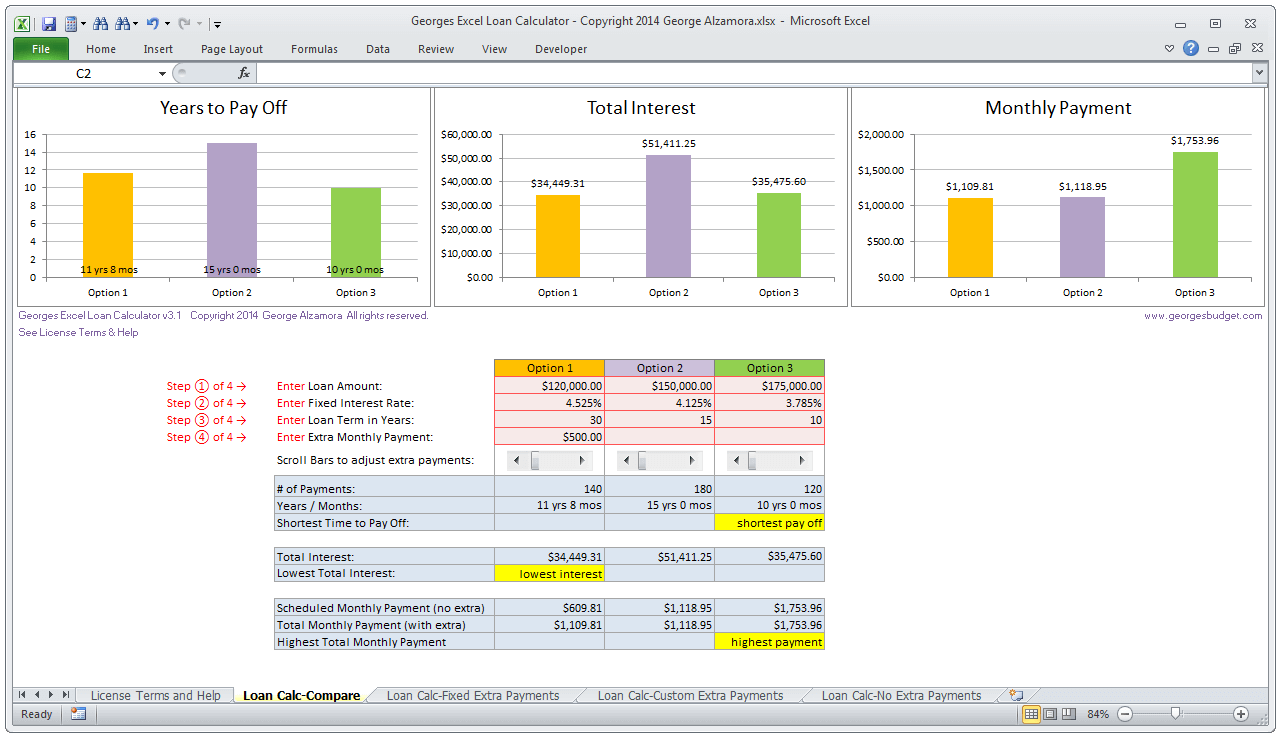
For example, a hypothetical buyer could compare homes priced at 300,000, 350,000, and 400,000. The template might reveal that the first two options leave substantial room in the household budget while the third consumes nearly all of the selected housing ceiling. The conclusion would not be that 400,000 is impossible, but that it carries a materially higher budget risk under the chosen assumptions.
The scenario method is also useful when discussing a purchase with another decision-maker. Instead of arguing over a preferred price, the household can review the same assumptions and see how each option affects monthly obligations and cash reserves. This turns a subjective discussion into a structured financial comparison.

Common design mistakes to avoid
The first common mistake is mixing annual and monthly figures. Annual income can be converted to monthly income, but annual property taxes or insurance should not be entered into a monthly field without conversion. Clear labels such as “per year” and “per month” reduce this error considerably.
The second mistake is using an unexplained ratio. A worksheet that automatically assumes a particular debt ratio can create a false impression of authority. It is better to label the ratio as a planning assumption and make it editable, especially when the same worksheet may be used in different countries or for different loan types.
The third mistake is ignoring costs outside principal and interest. Taxes, insurance, association charges, mortgage insurance, maintenance, utilities, and transaction costs can all affect the real household budget. Not every cost needs to be part of the lender-style formula, but the worksheet should provide a place to consider them.
Another mistake is treating a calculated maximum as a target. The highest number produced by a model is a ceiling under a set of assumptions, not necessarily a sensible shopping budget. A household may deliberately choose a lower price to preserve savings capacity, manage irregular income, or maintain flexibility for future expenses.
A further mistake is changing several assumptions at once. If income, interest rate, down payment, term, and purchase price all change simultaneously, it becomes difficult to understand why the result moved. Better analysis changes one or two variables at a time and records the resulting payment and affordability outcome.
Finally, users should avoid presenting a personal worksheet as an official lender qualification. Formal underwriting can consider credit history, income documentation, employment, assets, liabilities, property details, loan type, and many other factors. The worksheet is most valuable as preparation for that process.
When a Word, PDF, or printable format makes sense
A document-based template can be useful when the main goal is review rather than continuous recalculation. A mortgage affordability calculator template template word format can present the assumptions, formulas, and results in a clean report that is easy to annotate. The document should still make clear which values are entered by the user and which values are calculated.
A mortgage affordability calculator template template pdf format is particularly useful for preserving a finished scenario. Because a fixed document does not necessarily recalculate like a spreadsheet, it is best treated as a record of assumptions and results. The date and rate assumption should be included so that an old scenario is not mistaken for a current estimate.
A printable worksheet should prioritize legibility. Input fields should be large enough for handwriting, units should be obvious, and the output should be separated from the assumptions. A simple checklist can ask whether income figures have been verified, debts are current, cash reserves have been separated from the down payment, and recurring property costs have been estimated.
Practical Solution
Start by building one master worksheet with four clearly separated areas: income and debts, cash and purchase assumptions, housing costs, and results. Enter gross annual income and recurring monthly debt payments first. Then enter the planned down payment, interest rate, loan term, property tax estimate, insurance estimate, mortgage insurance assumption where relevant, and any association fee.
Next, calculate the monthly debt ceiling using the chosen planning ratio and subtract existing debts. Separately calculate the housing-only ceiling if you want to test a front-end ratio. Use the more restrictive applicable result as the total housing budget, then subtract taxes, insurance, mortgage insurance, and association costs to determine the principal-and-interest amount that the model can support.
Convert that principal-and-interest amount into an estimated loan balance using the chosen interest rate and term. Add the intended down payment to estimate a purchase-price ceiling. Then run at least three scenarios: a conservative case, a central case, and a higher-cost case. Record the monthly payment, total housing cost, debt ratio, loan amount, and remaining cash for each scenario.
After the calculation works, test the worksheet with simple numbers that can be checked independently. Confirm that annual income divided by twelve produces the intended monthly income, that the debt ratio is calculated from the correct income figure, and that the loan payment changes when the rate or term changes. Test a zero or very low debt case as well as a high-debt case to make sure the limiting logic behaves sensibly.
Then review the result as a household budget rather than as a lender qualification. Ask whether the proposed payment leaves enough room for food, utilities, transportation, insurance, maintenance, savings, emergencies, and other priorities. The CFPB’s guidance is especially useful here: the question is not simply how much a lender might approve, but what payment fits comfortably within the household’s wider financial priorities.
Finally, record the date of the scenario and the source of major assumptions such as the interest rate, tax estimate, and insurance estimate. When circumstances change, create a new scenario rather than silently overwriting the previous one. This creates a useful history of how affordability changes as income, debts, rates, or cash reserves change.
Technical considerations for spreadsheet builders
For spreadsheet designers, the calculation chain should be modular. Income calculations should feed debt ratios; debt ratios should feed the housing ceiling; housing costs should reduce the amount available for principal and interest; and the loan calculation should convert that payment into a supported balance. This makes errors easier to locate than a single large formula.
Named ranges or clearly labeled cells can improve readability. Input validation can restrict rates to sensible ranges and prevent negative values where they do not make sense. Conditional formatting can highlight a scenario when the calculated payment exceeds a chosen household budget or when the cash reserve falls below the selected target.
For readers encountering the phrase mortgage affordability calculator template template sandbox, the likely technical interest is in testing the calculation logic in an isolated environment. A sandbox can be useful for checking formulas, edge cases, and alternative assumptions before a production workbook is circulated. The calculation should remain understandable even when transferred between spreadsheet systems.
Another technical search phrase, mortgage affordability calculator template template function overload, points toward software-oriented terminology rather than ordinary mortgage planning. If a calculator is being implemented in code, avoid ambiguous function signatures for inputs that have similar meanings but different units. For example, annual income and monthly income should not be accepted interchangeably without an explicit conversion rule.
Currency handling is another important technical consideration. The mathematical structure can remain currency-neutral, but formatting should match the market being modeled. A rate should be stored as a numeric percentage rather than as text, and dates should use real date values where payment schedules depend on them.
Before publishing a calculator, test edge cases such as a zero-interest hypothetical, a very large down payment, existing debts that consume most of the debt ceiling, and a very short or very long term. These tests can expose formula errors that may not appear in an ordinary scenario.
How to interpret the final affordability result
The final number should be read as an estimate produced from stated assumptions. If the result changes sharply when one assumption changes slightly, the household should recognize that sensitivity rather than treating the output as a fixed budget. A useful worksheet makes that sensitivity visible through scenarios rather than hiding it.
The most important output may actually be the limiting factor. If income is the constraint, increasing the down payment may have a smaller effect than expected. If existing debt is the constraint, reducing a monthly obligation can materially change the result. If taxes and insurance consume a large share of the housing budget, the purchase price may need to be lower even when the principal-and-interest payment appears manageable.
A mortgage affordability calculator should therefore support a decision, not make the decision. Its greatest value is showing the relationship between assumptions. When used this way, the worksheet becomes a planning framework that can be revisited as rates, income, savings, debts, and property costs change.
Reference Examples
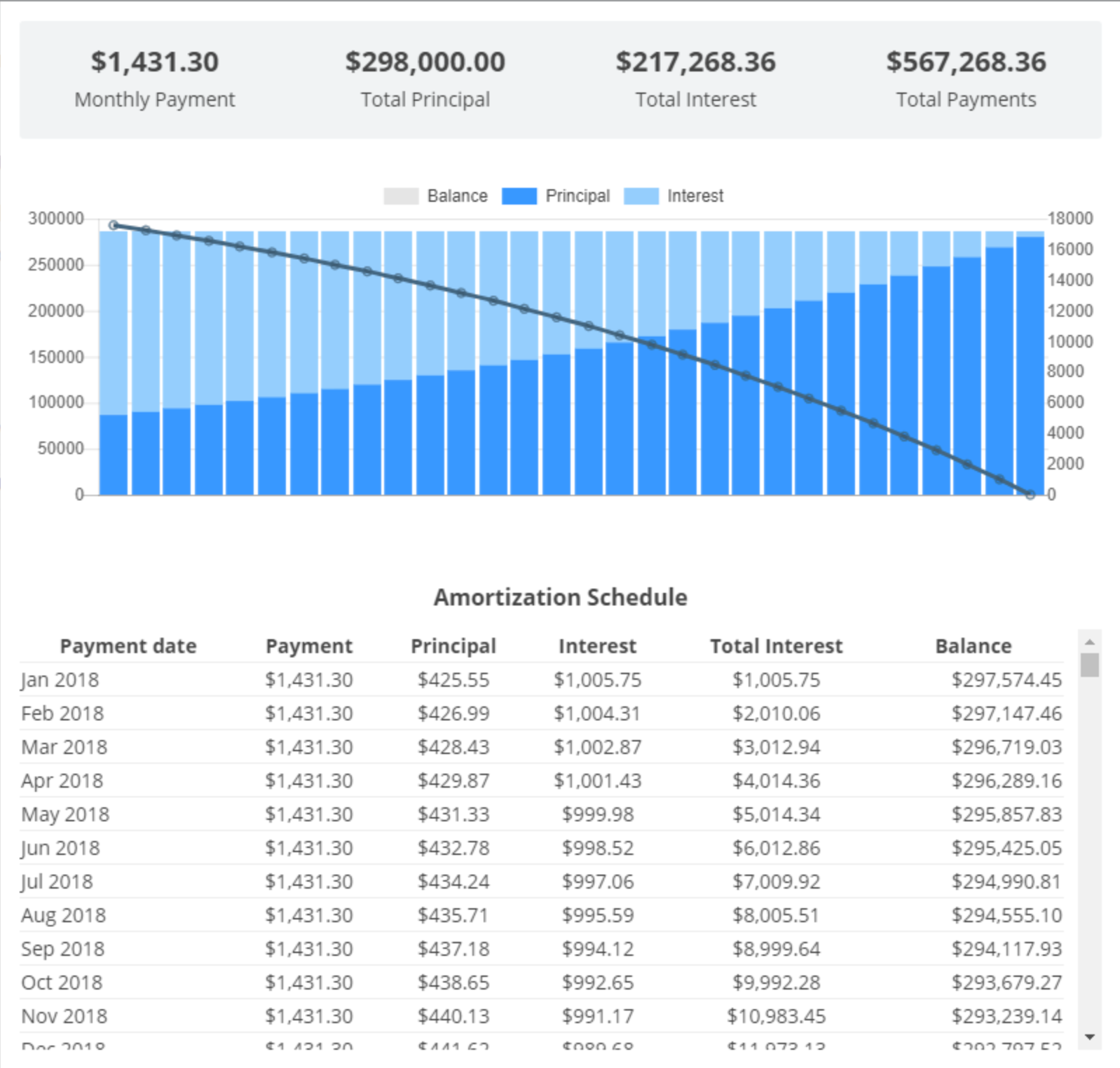
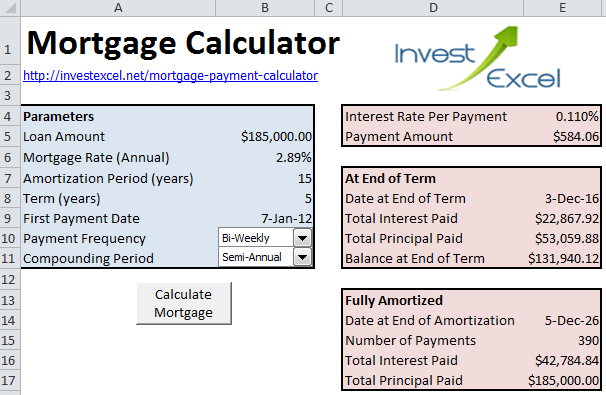
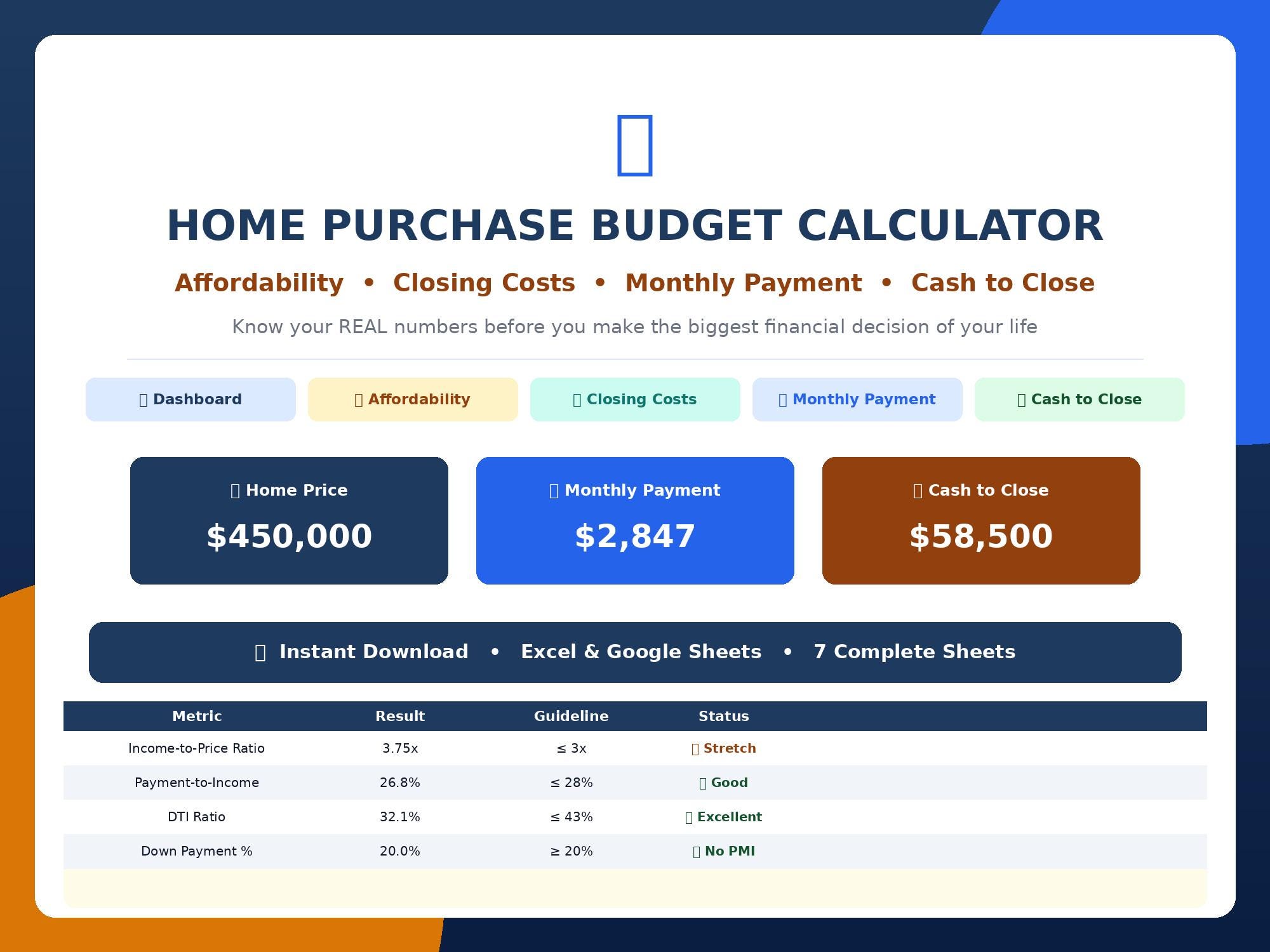
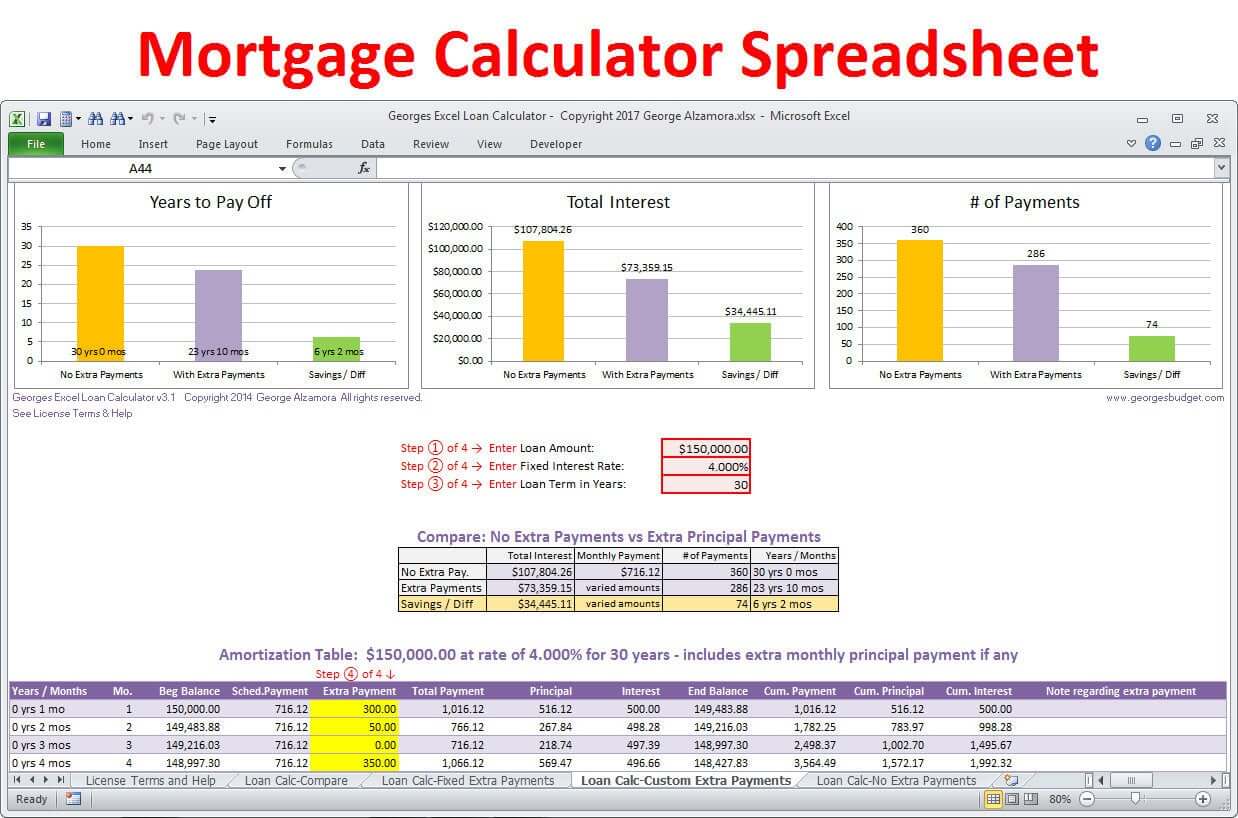
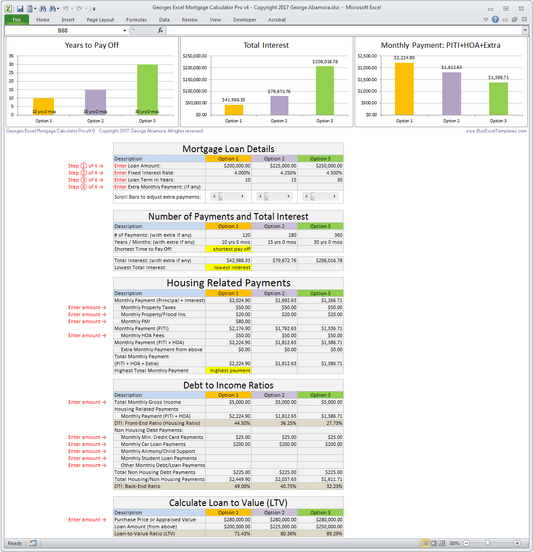
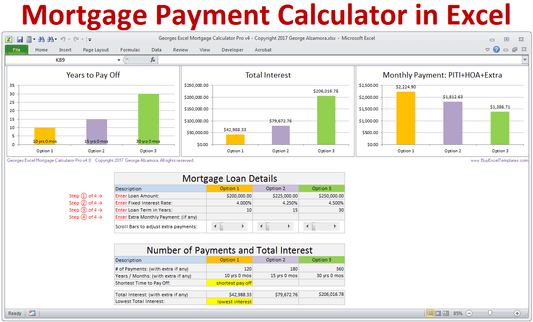
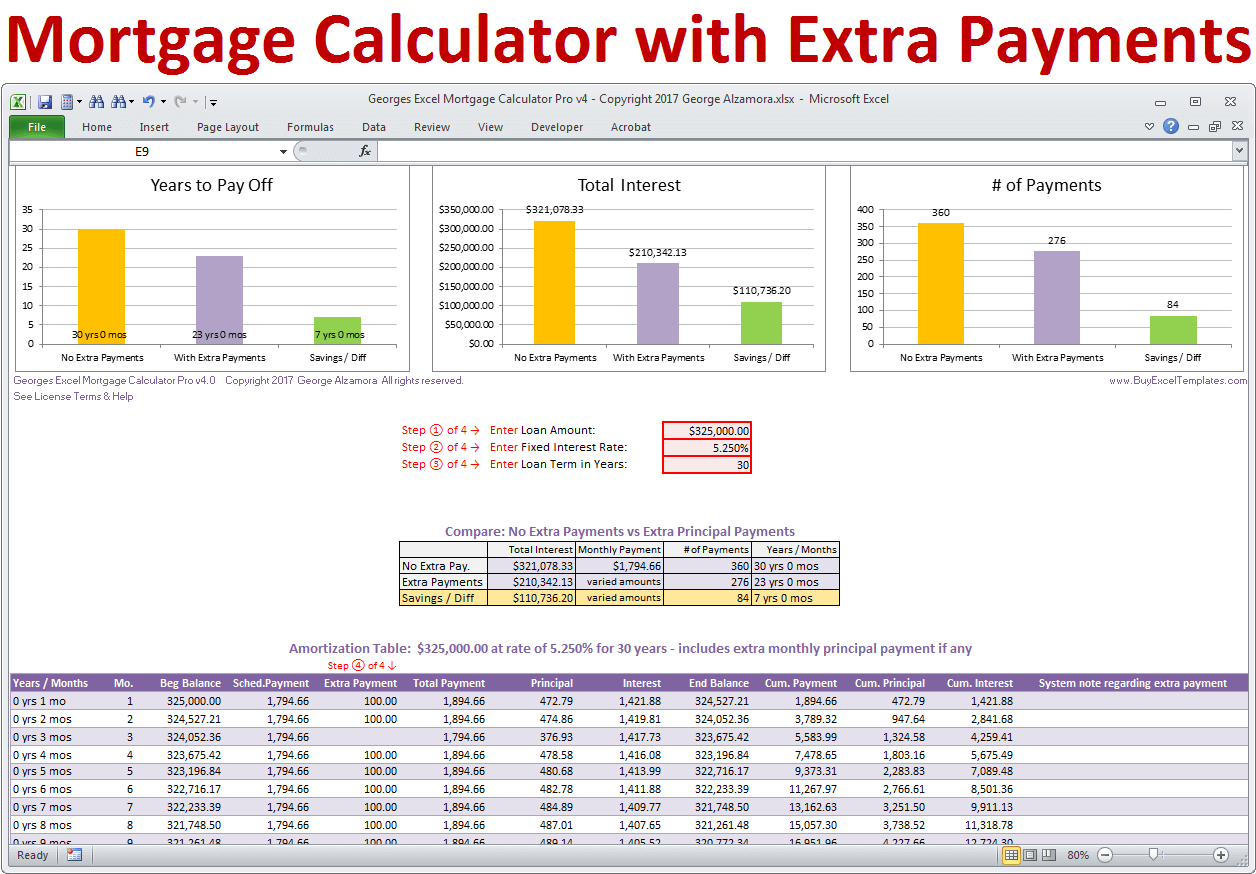
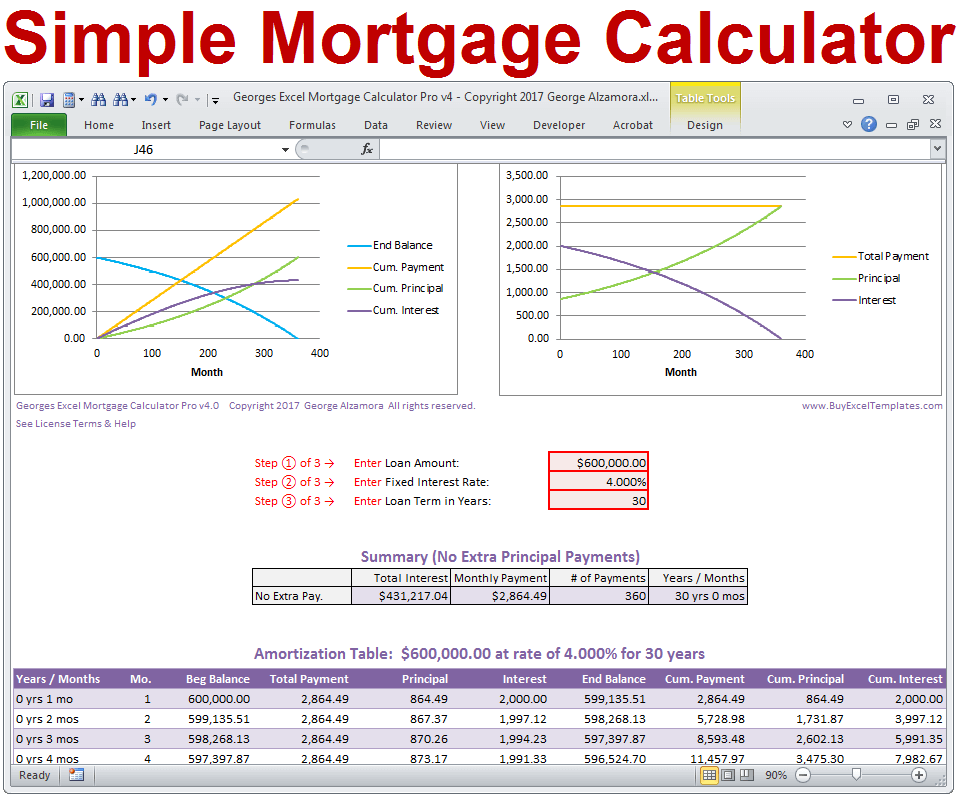
A mortgage affordability calculator template is easiest to understand when its structure can be compared with real worksheet layouts. The examples below show different ways of organizing income, debt, housing costs, loan assumptions, ratios, and payment schedules. Some emphasize lender-style qualification, while others focus on personal budgeting or repayment mechanics. The important feature to look for is not a particular visual style but the connection between inputs and outputs: a useful model makes the assumptions visible, keeps units clear, and lets the reader understand why a particular affordability figure was produced.
These visual references also demonstrate why there is no single ideal layout for every borrower. A concise worksheet may work well for a quick planning conversation, while a detailed workbook can support scenario comparisons, amortization, taxes, insurance, and debt ratios. When reviewing any mortgage affordability calculator template, compare the fields it includes with the information you actually need. A template that omits a major recurring cost may appear simple while producing a less useful picture of sustainable housing expense.

Mortgage Pre-Qualification Worksheet
Source: Worksheets Library

Conventional Mortgage Qualification Worksheet
Source: Worksheets Library
Mortgage Ready Worksheet

Source: Scribd

ANZ Home Loan Borrowing Calculator
Source: Ronald T. Raharjo
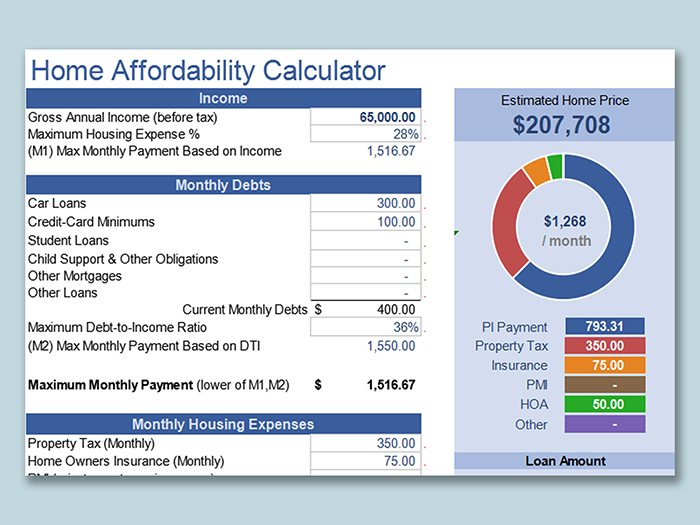
Home Affordability Calculator
Source: WPS Office Academy
