A business client information sheet is a practical document that helps businesses collect, organize, and maintain important information about their clients. Instead of keeping essential details scattered across emails, spreadsheets, notebooks, and different software platforms, a well-structured client information sheet puts the most relevant information in one convenient place.
Whether you run a consulting firm, marketing agency, accounting practice, service business, or small company, collecting accurate client information can make everyday communication much easier. A professional template can also create a more consistent onboarding process and help your team understand each client’s business, contacts, goals, and support requirements.
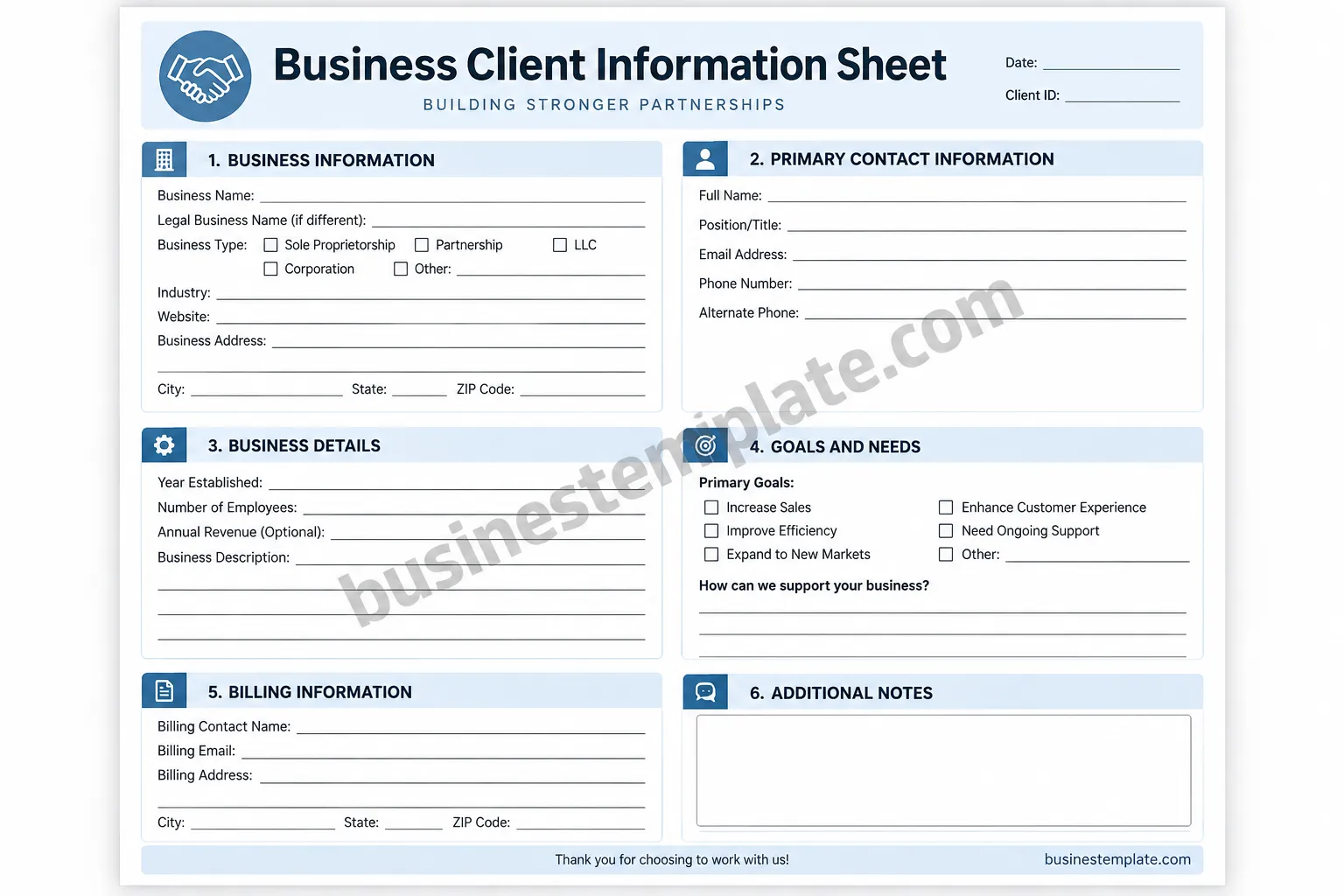
For businesses that want a simple printable solution, a business client information sheet template can provide a ready-to-use structure while still allowing the document to be customized for different industries and client relationships.
What Is a Business Client Information Sheet?
A business client information sheet is a structured form used to collect important information about a business customer or client. Depending on the purpose of the document, it may include company details, contact information, business background, billing information, goals, preferences, and additional notes.
The document can be used as a printable form, digital form, onboarding worksheet, internal reference document, or starting point for transferring information into a customer relationship management system.
A good client information form should make it easy for both the client and the business team to understand what information is required. Clear labels, logical sections, and enough space for answers are especially important.
Why Use a Business Client Information Sheet?
Client information is often collected during the first conversation or onboarding stage. Without a consistent process, important details can easily be missed. A standardized business client information form helps create a repeatable workflow.
1. Keep Client Details Organized
A client information sheet gives your team a central reference for basic business details. Instead of searching through multiple messages, employees can quickly review the information recorded during onboarding.
2. Improve Client Onboarding
A structured form gives new clients a clear way to provide the information your business needs. This can reduce unnecessary back-and-forth communication and help your team begin working with better context.
3. Support Better Communication
Recording the primary contact’s name, job title, email address, phone number, and other relevant communication details can make it easier to reach the right person when questions arise.
4. Create Consistent Records
When every client is documented using a similar format, information becomes easier to review and compare internally. A consistent process is particularly useful when several employees work with different clients.
What Information Should a Client Information Sheet Include?
The exact fields will depend on your business, but an effective business client information sheet template generally includes several core categories.
Business Information
Start with basic company information such as:
- Business name
- Legal business name
- Business type
- Industry
- Website
- Business address
- City, state, and ZIP code
This section establishes the identity of the client and provides useful background information for your team.
Primary Contact Information
Record the details of the person who will be the main point of contact. Common fields include:
- Full name
- Position or job title
- Email address
- Phone number
- Alternate phone number
If several people will be involved in the relationship, consider adding a separate contact section or maintaining additional contact records.
Business Details
Additional company information can provide useful context for future work. Depending on your needs, you may collect the year established, approximate number of employees, business description, and other relevant background information.
Financial information such as annual revenue should only be collected when it is genuinely necessary and appropriate for your business process.
Goals and Client Needs
One of the most useful parts of a client intake form is a section dedicated to goals and needs. Rather than collecting contact details only, ask what the client wants to accomplish.
Possible objectives might include increasing sales, improving efficiency, expanding into new markets, enhancing customer experience, or receiving ongoing support.
Billing Information
If your business invoices clients, a dedicated billing section can help separate financial administration from general contact information. Useful fields may include the billing contact, billing email, and billing address.
Additional Notes
Leave space for information that does not fit neatly into the other sections. This can include special requirements, project notes, communication preferences, or details that the team should remember.
How to Create an Effective Business Client Information Sheet
Use Clear Categories
Group related questions together. Business details, contact information, goals, billing, and notes should have distinct sections so users can find information quickly.
Only Ask for Necessary Information
A longer form is not automatically a better form. Avoid collecting unnecessary personal or business information simply because there is space available. Every field should have a clear purpose.
Make the Form Easy to Complete
Use straightforward labels and enough writing space. If the document is intended to be printed, consider how much room users will have to handwrite their responses.
Make Optional Fields Clear
If certain information is not required, label it as optional. This prevents clients from wondering whether they must provide information that your business does not actually need.
Keep the Design Professional
A clean layout can make a business client intake form feel easier to use. Consistent headings, readable typography, clear borders, and logical spacing can improve the overall experience without making the document unnecessarily complicated.
Printable vs. Digital Client Information Forms
A printable client information sheet can be useful for meetings, consultations, in-person onboarding, and businesses that prefer physical records. It can also serve as a simple worksheet before information is entered into digital systems.
Digital forms, on the other hand, can make it easier to collect information remotely, validate fields, store records, and connect submissions to other business tools.
Many businesses can benefit from using both. A printable template can provide a familiar backup format, while a digital client intake process can handle information collected online.
Practical Tips for Managing Client Information
- Review information regularly: Client contact details and business circumstances can change.
- Use consistent naming: Keep company and contact names formatted consistently across records.
- Limit access: Only authorized team members should have access to sensitive client information.
- Keep records accurate: Update outdated phone numbers, email addresses, and business details.
- Separate necessary and optional data: Collect only information that supports a legitimate business purpose.
- Create a repeatable onboarding process: Use the same basic workflow for each new client while allowing room for industry-specific requirements.
Who Can Use a Business Client Information Sheet?
This type of template can be adapted to many different businesses and professional services.
- Consultants and coaches
- Marketing and advertising agencies
- Freelancers
- Accounting and bookkeeping firms
- Legal and professional service businesses
- Business-to-business service providers
- Real estate and property service companies
- IT and technology consultants
- Design agencies
- Small businesses managing recurring clients
The most useful version is the one that matches the information your team actually needs to deliver its services.
How to Customize a Business Client Information Sheet Template
A template should be treated as a starting point rather than a rigid document. Remove fields that are irrelevant to your business and add questions that help your team understand your particular clients.
For example, a marketing agency may want campaign objectives and target audience information, while an accounting firm may require tax-related business details. A software consultant may need technical contacts, existing systems, and project requirements.
Keep the core structure simple, then add industry-specific fields only when they provide meaningful value.
Business Client Information Sheet Best Practices
The strongest client information sheets balance completeness with simplicity. Before using your template, review every field and ask whether the information will actually be used.
Make the document easy to scan, avoid ambiguous questions, provide enough space for longer answers, and clearly distinguish required information from optional details. If the document contains sensitive information, establish appropriate internal procedures for storage, access, retention, and disposal.
It is also useful to review your template periodically. As your business grows, the information you need from clients may change. Updating the form can help keep your onboarding process aligned with current workflows.
Conclusion
A well-designed business client information sheet provides a simple way to organize essential client details and create a more consistent onboarding experience. By bringing business information, contact details, client goals, billing information, and notes together in one structured document, businesses can reduce confusion and make important information easier to access.
The best template is not necessarily the one with the most fields. It is the one that collects the right information in a clear, practical, and easy-to-maintain format. Start with the essential details, customize the sections for your industry, and review the form regularly to keep it useful.
Whether you use a printable business client information form or adapt the template into a digital workflow, a clear information sheet can become a valuable part of an organized client management process.
