A template is useful because it separates two jobs that are easy to confuse. The first is designing a clear reporting structure; the second is conducting and documenting the research itself. A good template handles the recurring structural work while leaving the researcher free to focus on questions, evidence, methods, findings, interpretation, and recommendations.
There is no single universal research-report format. Universities and professional disciplines use different conventions, and a scientific report may use an IMRaD structure while a business or project report may emphasize an executive summary, findings, analysis, recommendations, and appendices. University guidance consistently stresses adapting the structure to the audience, purpose, discipline, and assignment requirements.
Google’s own documentation confirms that Google Docs provides templates and that users can open a template from the Template Gallery and create a copy for editing. Google Workspace also supports templates across Docs, Sheets, Slides, Forms, and Sites, making it possible to build a connected research workflow rather than treating the report as an isolated file.
This guide explains how to choose, build, customize, and use a research report template in Google’s ecosystem. It also covers research design, data collection, analysis, collaboration, version control, presentation, common mistakes, and a practical workflow that works for students, academics, consultants, analysts, and business teams.
What Is a Research Report Template?
A research report template is a pre-structured document that gives a research project a consistent framework. Instead of opening a blank page and wondering what comes next, the researcher begins with defined areas for information such as the title, research purpose, background, literature review, methodology, results, discussion, conclusion, references, and appendices.
The template should be treated as a framework rather than a substitute for research. It cannot determine whether a research question is worthwhile, whether a sample is appropriate, whether evidence is reliable, or whether an interpretation is justified. Those decisions remain the responsibility of the researcher.
A useful template also makes the reader’s experience more predictable. Readers should be able to locate the research question, understand why the study was undertaken, see how evidence was collected, review the findings, and understand what those findings mean. Structured headings, tables, figures, and navigation features make that process easier.
University report-writing guidance commonly identifies components such as a title page, abstract or executive summary, contents page, introduction, methodology, findings or results, analysis or discussion, conclusion, recommendations, references, and appendices. The exact sequence varies by discipline, which is why a template should be customized rather than followed mechanically.
For a practical starting point, Google’s official documentation on templates explains how to open templates in Docs, Sheets, Slides, and Forms. It also explains that a template can be copied and then edited as an ordinary file. This is useful when building a reusable research-report system for repeated projects.
Why Templates Improve Research Reporting
The first benefit is consistency. When multiple reports are produced by one researcher or team, a common structure reduces variation in headings, terminology, formatting, and placement of supporting material. Consistency is especially valuable when reports will be reviewed by supervisors, clients, executives, or assessment panels.
The second benefit is speed. A researcher should not have to rebuild the same title page, heading hierarchy, table style, or appendix structure every time a new project begins. Once the recurring layout has been designed, the saved structure becomes an operational asset.
The third benefit is completeness. A well-designed template can act as a checklist. If the methodology section is empty, for example, that absence becomes visible before submission. Similarly, an appendix placeholder can remind the researcher to attach a questionnaire, coding framework, supplementary table, or other supporting material.
The fourth benefit is collaboration. Google Docs supports collaborative editing, comments, and version history, which can make review easier than passing multiple attachments between team members. A shared document can become the working source of truth while reviewers contribute comments and suggestions in the same environment.
The fifth benefit is reader usability. A report with clear heading levels and logical navigation is easier to scan. This matters because readers may not consume a report linearly; a manager may read the executive summary and recommendations first, while an academic reviewer may examine the methodology and references in greater detail.
How to Choose a Research Report Template Google Format
The best template depends on the purpose of the research rather than the software used to create it. Before selecting a design, identify who will read the report, what decision or academic requirement it serves, what evidence will be presented, and whether the final product is primarily a document, a data workbook, or a presentation.
A student completing a research assignment may need a conventional academic structure with an abstract, introduction, literature review, methodology, results, discussion, conclusion, references, and appendices. A market researcher may need an executive summary, research objectives, methodology, market context, findings, customer insights, limitations, and recommendations.
A technical researcher may need detailed methods, assumptions, formulas, technical diagrams, experimental results, uncertainty information, and appendices. A nonprofit evaluation report may emphasize program objectives, indicators, participant information, outcomes, limitations, lessons learned, and recommendations.
The visual design should support the content. Decorative elements should never make headings difficult to scan, tables difficult to read, or charts difficult to interpret. A restrained layout is generally more adaptable because it can accommodate different quantities of text and different types of evidence.
Google Docs is particularly useful when the report is text-heavy and needs frequent collaboration. Google Sheets becomes more valuable when the research depends on structured datasets, calculations, coding, survey responses, or charts. Google Slides is better suited to a condensed presentation of findings for an audience that needs the main conclusions rather than every methodological detail.
Report Template Structure: A Reliable Starting Point
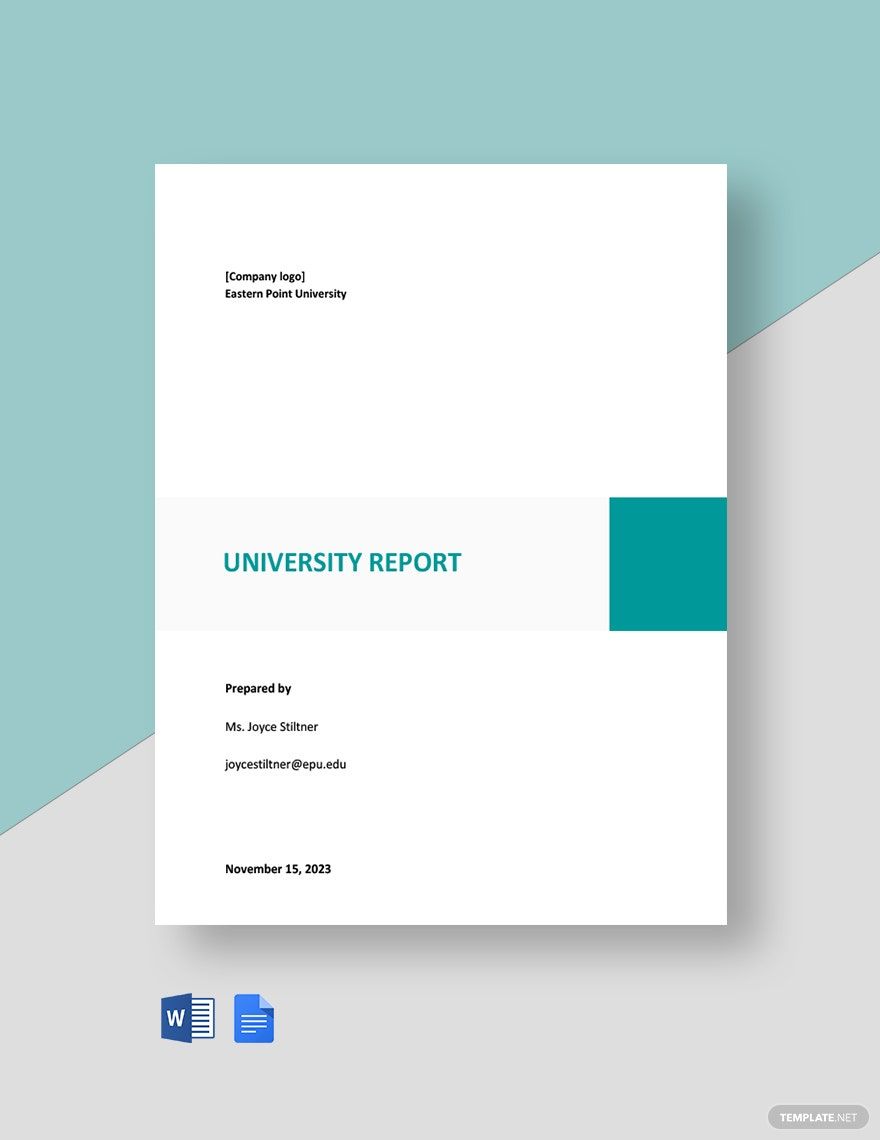
A strong general-purpose structure begins with a title page. The title should identify the subject clearly without becoming unnecessarily long. Include the author or research team, organization or institution, date, and any other information required by the assignment or commissioning organization.
Next comes the abstract or executive summary. An academic abstract normally summarizes the research purpose, methods, major findings, and conclusion. An executive summary for a business report can be more decision-oriented and may include key recommendations. Write this section after the main report is complete whenever possible.
The introduction explains the problem, topic, context, purpose, scope, and research questions. It should give readers enough information to understand why the study matters without turning into a long history lesson. The introduction should establish the logic that leads naturally to the research objectives.
The methodology explains how the investigation was conducted. Depending on the discipline, this may include research design, participants or sample, materials, instruments, procedures, data sources, variables, analytical techniques, ethical considerations, and limitations. The objective is reproducibility and transparency rather than unnecessary detail.
The results and discussion sections then move from evidence to meaning. Results should present what was observed or calculated, while discussion interprets significance, relationships, implications, alternative explanations, and limitations. A conclusion should answer the research question without introducing evidence that was never presented earlier.
Research Report Template Google Docs: Building the Main Document
A research report template google docs workflow is most effective when the document is built around styles instead of manual formatting. Use heading levels consistently so that the document can generate a navigable outline and, where appropriate, a table of contents.
Start by creating the major sections before writing full paragraphs. For example, create placeholders for Introduction, Literature Review, Methodology, Results, Discussion, Conclusion, References, and Appendices. Then add the relevant subsections underneath each major heading.
Use one heading level for major sections and another for subsections. Avoid jumping randomly from a major heading to a deeply nested heading. A predictable hierarchy helps readers understand the relationship between topics and makes future editing easier.
Tables should be used when information is easier to compare in rows and columns. Figures should be used when patterns, relationships, trends, or distributions are easier to understand visually. Every table and figure should have a meaningful label and should be discussed in the surrounding text rather than inserted without explanation.
Google’s official template documentation provides a practical way to start from a prepared design instead of building everything manually. For repeated work, a researcher can create a clean master document, maintain consistent styles, and make a copy for each new study rather than editing the original template directly.
A template gallery example illustrates why starting with a preformatted report can save time: the layout establishes page structure and typography before research content is inserted. The important principle is not to copy a design blindly but to select a structure that matches the requirements of the intended report.
One useful customization is to create a front-page information block containing the report title, author, date, organization, research period, and version number. This becomes especially valuable when a project produces multiple drafts or when several reports are created from the same research program.
Another useful customization is a standardized findings format. For example, each finding can contain a short heading, evidence, interpretation, and implication. This makes the report easier to scan and reduces the temptation to bury important conclusions inside long paragraphs.
A third customization is a limitations box or subsection. Research reports become more credible when limitations are stated clearly. Limitations might involve sampling, response rates, measurement constraints, data quality, missing information, time restrictions, or the inability to establish causation.
Finally, add an appendix system that can accommodate raw or supplementary material without interrupting the main narrative. Questionnaires, interview guides, detailed calculations, coding schemes, long tables, supplementary charts, and technical specifications can often be placed there.
The goal is to make the template strong enough to guide the writer but flexible enough to accommodate different research projects. A template that is too rigid can become a burden because the researcher spends more time fighting the structure than using it.
Research Report Template Google Sheets: Managing Research Data
A research report template google sheets workflow is useful when the report depends on structured observations, survey responses, experiments, financial data, market information, or other datasets. The spreadsheet should be treated as the research-data layer rather than the final narrative report.
Begin with a raw-data sheet that preserves the original observations. Avoid overwriting source values during cleaning. Create separate sheets for cleaned data, calculations, coding, summaries, and charts when the project is complex enough to justify that separation.
Use consistent column names and data types. Dates should be stored consistently, numeric values should remain numeric, and categorical responses should use standardized labels. A clean data structure reduces errors when formulas, filters, pivot tables, or charts are applied.
Document transformations. If missing values are excluded, categories are combined, duplicate records are removed, or derived variables are calculated, record what was done and why. A small data dictionary can explain the meaning of each important variable and any coding conventions.
Charts should answer specific questions. A line chart can show change over time, a bar chart can compare categories, and a scatter plot can explore relationships between variables. Avoid selecting chart types because they look attractive; select them because they make the evidence easier to interpret.

The spreadsheet shown here demonstrates how a chart can be configured from structured data. The specific values in an example should never be treated as evidence for another research project. Instead, the useful lesson is the separation between source data and the visual representation used to communicate it.
For a research report, each chart should have a clear title, meaningful category labels, readable units, and enough context to understand what is being measured. If a chart requires a long explanation before the reader can understand it, reconsider whether the chart is the right visualization.
Where possible, connect the spreadsheet’s analysis to the report without manually retyping every number. Manual copying creates opportunities for transcription errors. Before publication, however, verify that every linked or copied value matches the final approved dataset.
When research involves confidential or sensitive information, access controls matter. A shared spreadsheet should not automatically be open to everyone with a link. Researchers should use the narrowest practical access level and avoid placing identifying information into files that do not need it.
The best spreadsheet template is therefore not simply a colorful table. It is a controlled analysis environment with clear data definitions, reproducible calculations, documented transformations, and visual outputs that directly support the research questions.
Research Report Template Google Drive: Organizing the Project
A research report template google drive workflow addresses a different problem: file organization. Even a well-written report becomes difficult to manage when drafts, datasets, interview notes, charts, consent documents, references, and final outputs are scattered across unrelated folders.
Create one project folder and establish a consistent subfolder structure. A simple model might include 01 Planning, 02 Sources, 03 Data, 04 Analysis, 05 Drafts, 06 Figures, and 07 Final. Numbering folders can help keep the intended order stable across operating systems and collaborators.
Use descriptive filenames rather than vague names such as “research,” “new report,” or “final final.” A useful naming convention might include project name, document type, date, and version. For example, a team could distinguish a working draft from an approved deliverable without opening every file.
Version control should also be intentional. Google Drive and Google Docs provide version-management features, but a team should still agree on what constitutes an approved version. Version history is most useful when the project has a clear workflow for drafting, reviewing, revising, approving, and publishing.
Drive is particularly helpful when research involves multiple file types. A report can remain in Docs, data can remain in Sheets, supporting visuals can be stored as image files, and presentation material can remain in Slides while everything stays within the same project environment.
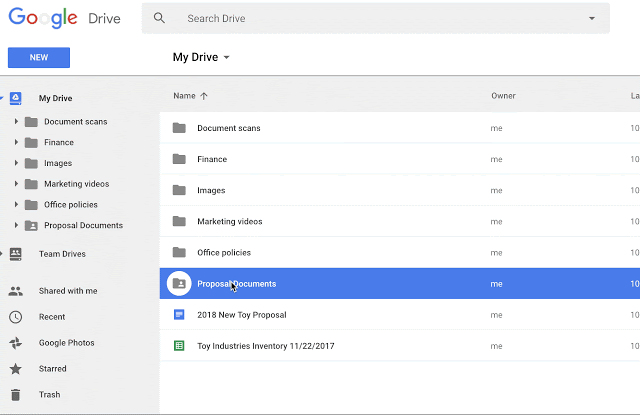
A shared-drive structure can be especially useful for teams because ownership and access can be separated from an individual researcher’s personal workspace. The exact permissions available depend on the Google Workspace environment, so organizational policies should always take precedence.
Do not use a single folder for everything. A report folder filled with raw spreadsheets, screenshots, draft documents, exported PDFs, and unrelated reference files becomes difficult to audit. Separate research evidence from derived analysis and published outputs.
At the end of a project, create a clear final package. Identify the approved report, final dataset or data extract where appropriate, analytical workbook, presentation, supporting materials, and documentation required for future review.
Good file organization also protects research continuity. If the original researcher leaves the project, another person should be able to understand which document is current, where the supporting data lives, and how the reported findings were produced.
Google’s Drive documentation describes creating Docs, Sheets, and Slides files from blank documents or templates. That makes Drive useful as the organizational layer connecting the components of a repeatable reporting process.
Research Report Template Google Slides: Turning Findings Into a Presentation
A research report template google slides workflow should not simply copy the full report onto presentation slides. A presentation has a different communication purpose. It should distill the research into the evidence, findings, interpretation, and recommendations that matter most to the audience.
A useful research presentation might begin with the research problem and objective, followed by the methodology, a small number of important findings, interpretation, limitations, and recommendations. Each slide should have one primary communication goal.
Charts from the analysis workbook can become presentation visuals, but they often need redesign. A chart that works in a detailed report may be too dense for a projected slide. Remove unnecessary labels, enlarge important numbers, and make the takeaway explicit.
Research presentations also benefit from visual consistency. Use the same terminology, colors, category names, and definitions used in the written report. Otherwise, the audience may wonder whether the presentation represents a different analysis.
A presentation template can also contain reusable layouts for methodology, findings, comparison, recommendation, and conclusion slides. This gives the team a repeatable visual language without forcing every project to look identical.

The example above illustrates how research concepts can be translated into presentation-ready visual modules. Although its subject matter is medical research, the underlying design principle is broadly useful: each visual block should communicate a specific idea and leave enough space for the audience to understand it quickly.
Do not overload slides with methodology details that belong in the written report. Instead, show the research design at a high level and be prepared to provide deeper documentation when questions arise.
Similarly, recommendations should be connected directly to findings. A recommendation that appears without evidence looks like an opinion. A recommendation supported by a clearly presented finding becomes a defensible action proposal.
For executive audiences, a concise research presentation may be more useful than a complete technical presentation. The detailed report can serve as the evidence base while the slides provide the decision-making layer.
The presentation should ultimately answer three questions: What did we investigate? What did we learn? What should happen next? If those answers are clear, the slides are doing their job.
Research Report Template Word Versus Google-Based Workflows
A research report template word approach remains useful when an institution specifically requires Microsoft Word, when a client has an established Word workflow, or when advanced formatting features are needed. Choosing Google Docs or Word should therefore be based on project requirements rather than a belief that one format is universally superior.
Google Docs has a major advantage when collaboration is central. Multiple people can work on a shared document, comments can be attached to specific text, and revisions can be reviewed without repeatedly emailing separate files.
Word may be preferable when the final submission has a strict institutional template, when collaborators use Microsoft 365 extensively, or when specialized formatting and publishing workflows are already established.
The content structure should remain portable. A well-designed research report should not depend on a particular software application’s visual tricks. Headings, tables, figures, references, citations, and appendices should remain logically organized even if the document is exported or converted.
One practical approach is to keep research data and collaborative working documents in the environment most convenient for the team while producing the final deliverable in the format required by the recipient. Always inspect the converted document because page breaks, tables, images, fonts, and references can change during conversion.

A strong report is ultimately judged by the quality of its reasoning and evidence, not by whether it was originally drafted in Word or Docs. Software should reduce friction rather than become the central focus of the research process.
When choosing between platforms, consider collaboration, institutional requirements, offline access, compatibility, citation tools, data integration, file ownership, and the skills of the people who will review or edit the document.
It is also useful to distinguish the working format from the delivery format. A team may collaborate in Google Docs and then export a PDF for a client, or draft in Word and later provide a PDF for distribution. The final format should be tested on the devices and software likely to be used by the recipient.
For academic work, follow the instructor, department, journal, or institution’s instructions first. A generic template is never more authoritative than a specific submission requirement.
The most reliable principle is simple: choose the platform that best supports the research workflow, then ensure the final document satisfies the recipient’s requirements.
How to Build a Research Template for a Report
A research template for a report should begin with the research question rather than the visual design. Before selecting fonts, colors, or cover pages, define what the study is trying to discover, measure, compare, explain, or evaluate.
Write the research objective in one or two precise sentences. Then break it into smaller research questions or objectives. Each major question should eventually connect to a method, a data source, an analysis approach, and a reported finding.
This alignment is one of the most important quality controls in research reporting. If an objective has no corresponding evidence, it may not have been investigated. If the report contains extensive data that do not relate to the objectives, the study may have accumulated information without a clear analytical purpose.
Next, identify the evidence required. Secondary research may involve published literature, official datasets, industry reports, archival material, or existing organizational records. Primary research may involve surveys, interviews, observations, experiments, usability studies, or other data-collection techniques.
Finally, map the evidence to the report structure. The template becomes a research map: the introduction establishes the problem, the methodology documents the approach, the results present evidence, the discussion explains meaning, and the conclusion answers the original question.
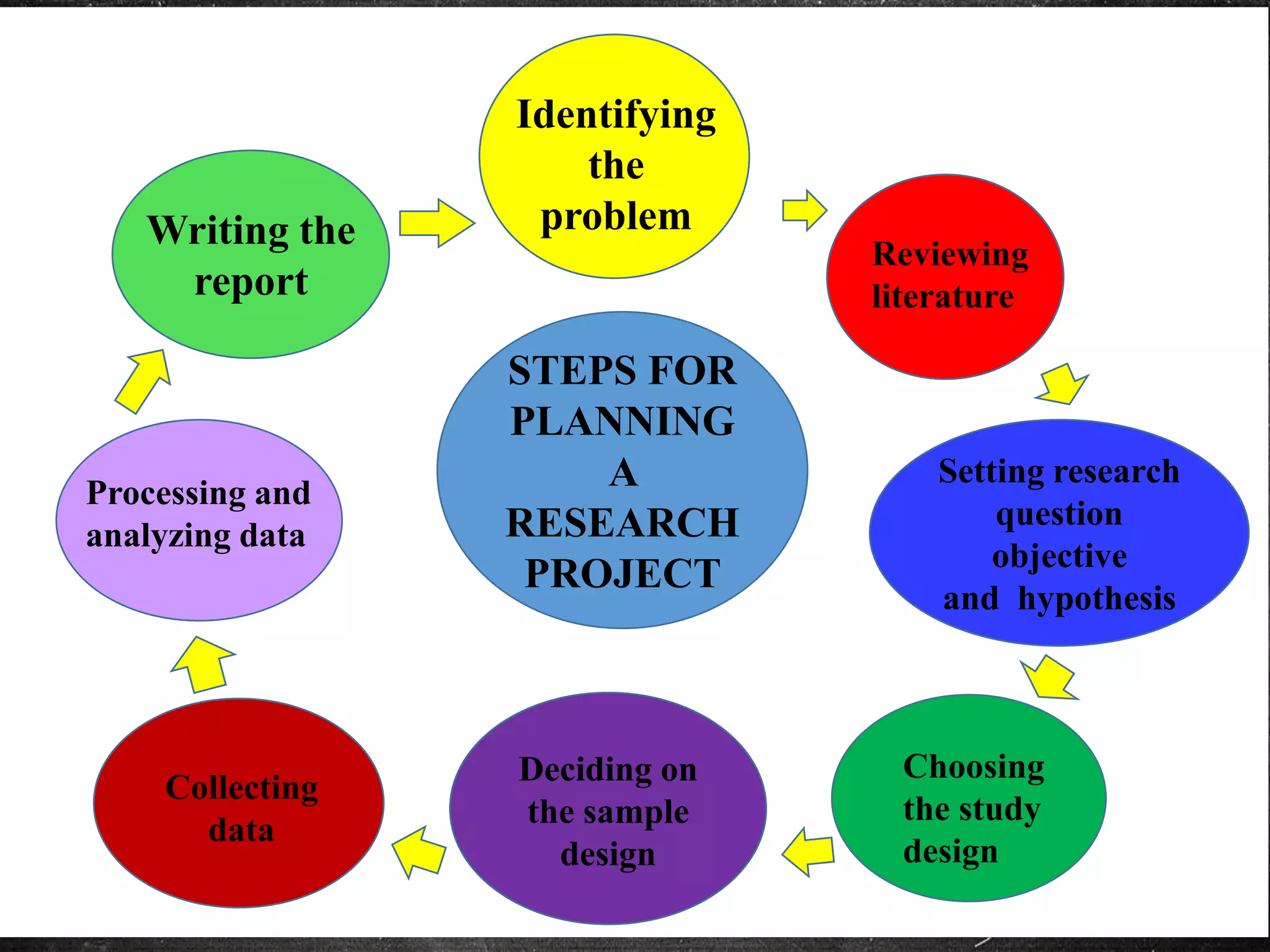
A research workflow is rarely perfectly linear. New evidence can reveal that the research question needs refinement, and early analysis can expose missing data or weaknesses in the sampling plan. A useful template should allow controlled revision rather than assuming that every project follows an unchanging sequence.
Document major changes to scope. If the research question changes significantly, record why. This is particularly important for team projects because people may otherwise continue working toward different interpretations of the project objective.
Keep a research log when the project is complex. The log can record important decisions, data-collection dates, methodological changes, unexpected events, and analysis decisions. This information can later make the methodology and limitations sections much easier to write accurately.
Use the report outline as a working checklist, but do not fill every section with speculative content. A placeholder should identify what is needed without creating the illusion that an unsupported conclusion already exists.
The best template therefore connects planning and reporting. It gives the researcher a place to capture decisions before those decisions become difficult to reconstruct from memory.
Data Collection: Designing Evidence That Fits the Report
Data collection should be driven by the research question. A survey is not automatically better than an interview, and quantitative data are not inherently more rigorous than qualitative evidence. The appropriate method depends on what needs to be known and what type of evidence can answer the question credibly.
Survey research can be efficient when the study requires standardized responses across many participants. Questions should be specific, understandable, and aligned with the research objectives. Avoid leading questions, unnecessary double-barreled questions, and response options that overlap or leave important answers unrepresented.
Interviews are useful when context, reasoning, experiences, or perceptions are important. A structured or semi-structured interview guide can provide consistency while allowing participants to explain issues that a fixed-response survey might miss.
Observation can be valuable when actual behavior matters more than self-reported behavior. Researchers should define what will be observed and how observations will be recorded so that the resulting evidence is systematic rather than purely anecdotal.
Secondary research requires careful source evaluation. Consider who produced the information, why it was produced, when it was published, what methods were used, and whether the source is appropriate for the research question. Do not treat an attractive chart or widely repeated claim as automatically reliable.

Research teams often collect multiple forms of evidence. A market study, for example, might combine published industry information, customer interviews, survey responses, competitor observations, and internal sales data. The report should explain how these sources complement one another.
Participant consent and ethical handling of information are important whenever people are involved. Researchers should follow the requirements of their institution or research ethics process, particularly when collecting personal, confidential, sensitive, or identifiable information.
Data quality should be checked during collection rather than only after the fieldwork ends. Missing answers, duplicate records, contradictory responses, and unusual values can be much easier to resolve while the research team still remembers how the data were produced.
Maintain a clear distinction between raw observations and researcher interpretation. The raw dataset should remain traceable even when the analysis involves recoding, aggregation, or transformation.
A well-designed report template can help by giving researchers dedicated places to document the sample, instruments, procedures, dates, sources, and quality-control measures used during collection.
Qualitative and Quantitative Research Reporting
Quantitative research usually depends on numerical measurements, structured variables, and statistical analysis. The report should identify the variables, sample, analytical methods, and assumptions clearly enough for the reader to understand what was calculated and why.
Qualitative research often works with interviews, observations, documents, open-ended responses, or other rich sources of textual or visual information. The report should explain how material was selected, coded, categorized, interpreted, and connected to the research question.
Mixed-method research combines quantitative and qualitative approaches. The key reporting challenge is integration. Merely placing a survey result next to an interview quotation does not automatically create a mixed-method analysis; the report should explain how the different evidence streams inform one another.
Templates should reflect these differences. A quantitative template may need fields for variables, statistical tests, tables, and confidence intervals, while a qualitative template may need space for themes, excerpts, coding decisions, participant characteristics, and researcher reflexivity.
Regardless of method, the report should make a clear distinction between evidence and interpretation. Readers need to know what was directly observed or calculated and what conclusion the researcher draws from that evidence.

Team-based research benefits from standardized definitions. If one researcher codes an interview response as “high satisfaction” while another uses “positive experience” for the same concept, later analysis can become inconsistent.
A coding guide can reduce this problem. It should define categories, inclusion criteria, exclusion criteria, examples, and rules for ambiguous cases. For quantitative projects, a data dictionary can serve a similar purpose.
Researchers should also record methodological limitations. A small sample, convenience sampling, self-selection, missing data, measurement constraints, or limited observation period can influence what conclusions are justified.
When limitations are presented transparently, they do not necessarily weaken a report. Instead, they help readers understand the boundaries within which the findings should be interpreted.
The template should therefore encourage researchers to document not only what worked but also what could not be controlled or measured adequately.
Analyzing Data and Presenting Findings
Analysis converts collected information into evidence that can answer the research questions. The appropriate technique depends on the type of data and the research design. The report should name the approach clearly and avoid presenting a sophisticated method merely for appearance.
Descriptive statistics can summarize distributions, averages, counts, proportions, or other characteristics. Inferential methods may be appropriate when the research design supports broader conclusions. Qualitative analysis may involve thematic coding, categorization, comparison, or interpretation of patterns.
The results section should normally focus on what the analysis produced. The discussion can then explain why the findings matter, how they relate to previous research, and what alternative explanations should be considered.
Charts and tables should be selective. A report does not become more rigorous because it contains dozens of graphs. Each visual should earn its place by helping readers understand an important result.
Numbers should also be interpreted responsibly. A difference between groups may be statistically detectable without being practically important, while a meaningful practical difference may require careful interpretation depending on the study design and uncertainty around the estimate.
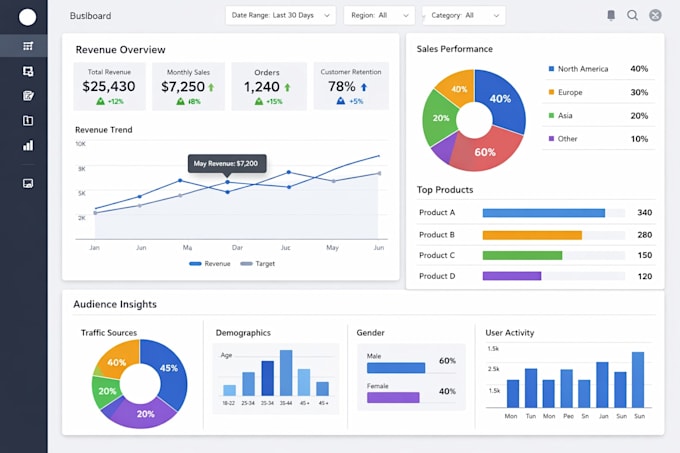
A dashboard-style visualization can be useful for exploring multiple measures, but a formal report often needs more focused visuals. Readers should not have to inspect a dense dashboard to discover the one result that matters to the research question.
Use consistent units and terminology throughout the report. If a measure is expressed as a percentage in one figure and a decimal in another, explain the difference or standardize the presentation.
Do not hide inconvenient findings. Selective reporting can create a misleading impression even when every individual chart is technically accurate. Explain unexpected, contradictory, or null findings where they affect interpretation.
Keep an audit trail between the source data, calculations, and reported values. This makes corrections easier if a reviewer identifies a discrepancy and strengthens confidence in the final document.
A strong research report makes the analytical path visible: question, evidence, method, result, interpretation, limitation, and implication.
Business and Market Research Applications
Research-report templates are especially useful in business environments because the same reporting cycle may repeat every quarter, project, product launch, or customer study. A standardized template can make recurring research faster while maintaining a consistent presentation for decision-makers.
A market research report might contain an executive summary, research objectives, market context, methodology, customer profile, competitor analysis, survey results, interview findings, key insights, limitations, and recommendations.
Competitor research should distinguish verified observations from assumptions. A company may observe a competitor’s public pricing, product features, positioning, or communications, but it should not present speculation about internal strategy as fact.
Customer research should similarly distinguish respondent statements from the researcher’s interpretation. A quote can illustrate a theme, but a single quotation does not establish that every customer shares the same view.
Recommendations should connect to evidence. If the research identifies a usability problem, the recommendation should explain what change is proposed, why it addresses the evidence, and what additional information may be needed before implementation.

Business research reports are often read under time pressure. A strong executive summary should therefore communicate the central finding, evidence base, implications, and recommended action without requiring the reader to study every page.
At the same time, the main report should preserve enough methodological detail for a reviewer to understand how the conclusions were reached.
Use an appendix for detailed survey questions, interview guides, supplementary tables, extended calculations, or additional charts. This keeps the main narrative focused without discarding useful evidence.
For recurring market research, maintain the same definitions and measurement rules across reporting periods where possible. Changing definitions can create apparent trends that are actually artifacts of the measurement system.
A reusable business template should therefore support both executive readability and analytical traceability.
Literature Reviews and Source Management
A literature review should do more than list publications. It should organize existing knowledge around themes, debates, methods, findings, limitations, and gaps that are relevant to the research question.
Begin by defining the scope of the review. Decide which topics, populations, dates, methods, or source types are relevant. Without boundaries, literature searches can expand indefinitely and make the final report unfocused.
Use a source-management system that records bibliographic information as the research progresses. At minimum, record the author, title, publication information, date, source location, and the reason the source is relevant.
Keep notes that distinguish the source’s claims from your own interpretation. This makes paraphrasing safer and reduces the risk of accidentally presenting another researcher’s conclusion as your own.
A research report template can include a literature-review matrix with columns for source, research question, method, sample, major findings, limitations, relevance, and notes. This matrix can remain in Sheets while the synthesized discussion is written in Docs.

A research library environment is a useful visual reminder that literature review is an evidence-management task, not merely a search exercise. The quality of the final review depends on how sources are evaluated, compared, organized, and integrated.
Avoid treating search-result rankings as evidence of scholarly importance. Evaluate the actual source, its methodology, its publication context, and its relevance to the question.
When sources disagree, do not automatically select the one that supports your preferred conclusion. Explain the disagreement and consider whether differences in populations, methods, definitions, or time periods account for it.
Good literature reviews identify what is known, what remains uncertain, and why the current research is needed.
The report template should make that logic visible rather than reducing the literature review to a collection of disconnected summaries.
Common Mistakes When Using Research Templates
The first mistake is treating a template as an official requirement when it is only a general example. A generic online report layout may look professional but still conflict with a university, journal, client, or organization-specific specification.
The second mistake is filling every placeholder simply because it exists. If a section does not serve the research question or reporting purpose, remove it or adapt it. Templates are tools, not rules.
The third mistake is confusing formatting with quality. A polished cover page cannot compensate for weak evidence, an unclear methodology, poor sampling, unsupported conclusions, or missing references.
The fourth mistake is writing the executive summary too early. Because the summary describes the finished research, it is usually easier and more accurate to write after the findings and conclusions are settled.
The fifth mistake is failing to update cross-references, tables of contents, figure numbers, and appendices after major revisions. A final quality-control pass should check these elements systematically.

Another common mistake is excessive visual decoration. Research reports should communicate evidence efficiently. Colors, icons, borders, and cover graphics should support hierarchy rather than compete with the research.
Researchers also sometimes place too much information into the main body. Detailed calculations and raw material can often move to appendices while the main text explains the essential evidence and interpretation.
Another problem is inconsistent terminology. If the report uses several names for the same variable, participant group, product, or research concept, readers may assume that the terms represent different things.
Finally, never assume that a template automatically makes a report accessible. Check headings, contrast, table readability, link behavior, image descriptions where required, and the final exported format.
The strongest templates are intentionally simple. They reduce repeated work while leaving the researcher responsible for evidence, reasoning, accuracy, and editorial judgment.
Practical Solution: A Repeatable Google Research Reporting Workflow
The most practical solution is to build one connected workflow rather than searching for a different template every time a new project starts. Begin with a master report structure in Docs, a master data workbook in Sheets, a project folder in Drive, and a presentation structure in Slides.
Step 1: Define the research brief. Write the problem statement, purpose, research questions, intended audience, scope, deliverables, and deadline. If the audience is a senior decision-maker, plan for an executive summary. If it is an academic evaluator, plan for the discipline’s required structure.
Step 2: Build the report skeleton. Create the major headings and subheadings before drafting. Include only sections that serve the project. Establish styles, page numbering, figure conventions, table conventions, and reference formatting at the beginning rather than repairing them at the end.
Step 3: Set up the research data system. Create the raw-data area, cleaned-data area, analysis area, data dictionary, and visualization area in Sheets. Protect or restrict the raw data where appropriate so that analysis does not accidentally overwrite the original observations.
Step 4: Organize evidence in Drive. Separate planning files, sources, datasets, analysis, drafts, figures, and final outputs. Use descriptive names and establish one location that clearly represents the approved version.
Step 5: Conduct the research. Collect evidence according to the documented methodology. Record important methodological decisions while they happen instead of relying on memory months later.
Step 6: Analyze before writing conclusions. Clean and inspect the data, perform the planned analysis, investigate anomalies, and document changes. Avoid writing a conclusion first and then searching for evidence to support it.
Step 7: Draft the findings. Present the most relevant results in an order that mirrors the research questions. Use tables and figures selectively. Each major finding should be understandable without forcing the reader to search through unrelated sections.
Step 8: Write the discussion. Explain what the findings mean, how they relate to previous evidence, what alternative explanations exist, and what limitations affect interpretation. This is where analytical reasoning should be most visible.
Step 9: Write the conclusion and recommendations. Answer the research questions directly. Recommendations should follow from the evidence and should identify practical next steps where appropriate.
Step 10: Build the presentation. Reduce the report to a concise story: problem, approach, evidence, findings, implications, and action. Use slides to communicate the essential message rather than reproducing every paragraph.
Step 11: Review the complete research package. Check the report against the original brief, verify numerical values against the dataset, inspect figures and tables, confirm references, check appendices, review permissions and confidentiality, and confirm that the final file is in the required format.
Step 12: Preserve the final version. Clearly identify the approved report and retain the supporting material necessary to understand how the findings were produced. A final research package should be understandable to someone who did not participate in every stage of the project.

This workflow turns a template into more than a document design. It becomes a repeatable research operating system that connects questions, evidence, analysis, writing, review, and delivery.
For individual students, the same process can be simplified. A Docs outline, one Sheets workbook, and one Drive folder may be enough. For a professional team, the system can be expanded with standardized naming, permissions, review stages, and presentation templates.
The important point is to establish the structure before the project becomes complicated. Retrofitting organization after hundreds of files and dozens of revisions have accumulated is far harder than creating a sensible system at the beginning.
A useful master template should also be reviewed after each major project. Remove sections that repeatedly cause confusion, improve instructions that reviewers misunderstand, and preserve components that consistently save time.
In this way, the template itself becomes a continuously improving research asset rather than a static document.
Reference Examples
The following examples illustrate the kinds of report, document, spreadsheet, Drive, and presentation visuals that can help when evaluating a research-report workflow. They are examples of visual structures, not universal institutional requirements.
research report template google

Source: Template.net
research report template google docs
Source: Business Insider
research report template google sheets
Source: Superchart
research report template google drive
Source: LiveBusiness
research report template google slides
Source: Nulivo Market
research report template google docs free
Source: Template.net
research template for a report
Source: SlideShare
free google doc report template

Source: Template.net
google doc report template
Source: Template.net
report template google docs
Source: CapCut
research template google docs
Source: Epic Essay
research report template word

Source: KeepFiling
Frequently Asked Questions
What should a research report template include?
A general template can include a title page, abstract or executive summary, introduction, literature review, methodology, results or findings, discussion, conclusion, recommendations, references, and appendices. The exact structure should be adapted to the discipline and submission requirements.
Is there one official research report template Google users must follow?
No. Google provides templates and template functionality, but the correct research-report format depends on the assignment, institution, discipline, client, journal, or organization. A Google template is a starting point rather than a universal academic standard.
Can I create a research report template in Google Docs?
Yes. You can create a well-structured master document with heading styles, tables, placeholders, formatting conventions, and reusable sections. For personal workflows, maintaining a master document and making a copy for each project is a practical approach.
What is the difference between Google Docs and Google Sheets for research?
Docs is primarily suited to narrative reporting, while Sheets is designed for structured data, calculations, analysis, and charts. A strong workflow often uses Sheets for the evidence and analysis layer and Docs for the final written interpretation.
Can Google Drive be used to manage an entire research project?
Yes. Drive can organize reports, datasets, research notes, source material, figures, presentations, and final deliverables. The main requirement is a clear folder structure and sensible file-naming and access practices.
Should the research report and presentation have the same content?
They should be consistent but not identical. The report can contain detailed methodology, evidence, references, and appendices, while the presentation should focus on the most important findings, implications, and recommendations for its audience.
How long should a research report be?
There is no universal length. A report should be long enough to establish the research context, explain the method, present sufficient evidence, justify interpretations, and document relevant limitations without adding material that does not serve the research purpose.
Should I write the abstract first?
Usually it is more efficient to write the abstract or executive summary after the main report is substantially complete. The final version can then accurately reflect the actual methods, findings, conclusions, and recommendations.
How should charts be used in a research report?
Use charts when they make an important pattern or comparison easier to understand. Each chart should have a clear title, appropriate labels and units, and enough surrounding explanation for readers to understand what the evidence shows.
Can a template improve research quality?
A template can improve consistency, completeness, organization, and reviewability, but it cannot guarantee research quality. The quality of the final report still depends on the research question, methodology, evidence, analysis, reasoning, source evaluation, and accuracy of interpretation.
Conclusion
The best research report template google workflow is not simply a predesigned document. It is a connected system for planning the research, collecting evidence, analyzing data, writing the report, managing files, collaborating with reviewers, and presenting conclusions. Google Docs can provide the narrative structure, Google Sheets can support data and analysis, Google Drive can organize the research package, and Google Slides can communicate the final findings. The strongest approach is to begin with the research question, select a structure that fits the audience and discipline, document methods and decisions carefully, separate evidence from interpretation, and customize the template rather than allowing the template to dictate the research. Once that workflow is established, future projects become easier to start, easier to review, and much easier for readers to understand.
